
Cosy vs LuxSign
Side-by-side comparison to help you choose the right product.

Transform your Slack into a vibrant community by automating member onboarding and introductions effortlessly with Cosy.
Last updated: February 28, 2026

LuxSign lets you securely sign and manage documents online in minutes, ensuring compliance and peace of mind across the.
Last updated: February 27, 2026
Visual Comparison
Cosy
LuxSign

Feature Comparison
Cosy
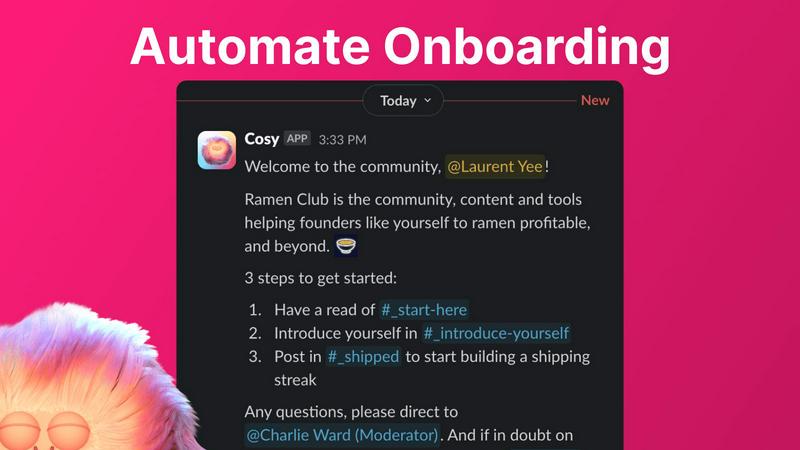
Automate Onboarding
Cosy allows you to create and automate up to 10 distinct onboarding welcome DM sequences. Whether the messages come from you, a team member, or the Cosy bot, new members will receive a warm welcome that can be customized with their names, links, emojis, and even time delays. This feature ensures that no one slips through the cracks when they join your community, even if they sign up at odd hours.
Connect Your Members
With Cosy, you can automatically introduce community members to each other via DMs, enhancing engagement and fostering connections. By customizing the frequency and timing of these introductions, you can create a vibrant network of relationships that grow organically within your community. Opted-in members are randomly selected for introductions, ensuring that everyone has the chance to connect with different people over time.
Member Directory
Cosy offers a simple, searchable directory of all your community members, allowing anyone to find and connect with others without leaving Slack. Members can customize their profiles with up to 10 custom fields, making it easier to engage and collaborate. Notifications prompt new joiners to fill out their profiles, ensuring that everyone stays informed about who is in the community.
Content Highlights
This feature lets you surface the top 10 most engaging posts in your community instantly. With a quick slash command, you can access the most engaged posts within a specific channel or across all public channels. Additionally, you can identify unreplied messages, ensuring that valuable discussions do not go unnoticed and that engagement is always encouraged.
LuxSign
Multiple Signature Methods
LuxSign offers diverse signature methods to accommodate different user preferences. You can draw your signature using your mouse, type your name, or upload an image of your signature. This flexibility ensures that signing documents is quick and easy, catering to personal preferences for a more authentic touch.
Advanced Security
Security is paramount with LuxSign. The platform employs industry-standard encryption to protect your documents throughout the signing process. Additionally, all data is securely stored within EU data centers, ensuring compliance with rigorous data protection regulations, making it a trusted choice for sensitive business transactions.
Email Notifications
Stay updated with LuxSign's automatic email notifications. Once documents are sent, viewed, or signed, you receive real-time alerts, keeping you informed every step of the way. This feature allows for better tracking and management of your documents, ensuring no step is overlooked.
Collaboration Workspaces
LuxSign enables teams to work together seamlessly through its collaboration workspaces. You can create shared folders for organizing documents, manage access for team members, and collaborate on signing workflows. This functionality enhances teamwork and productivity by simplifying document management.
Use Cases
Cosy
Streamlining Onboarding Processes
For community managers, onboarding new members can be a tedious task. Cosy automates this process, ensuring that each new member receives a personalized welcome message, thus saving significant time and effort. This automation allows managers to focus on building relationships and driving community initiatives.
Enhancing Member Engagement
Cosy’s automated introductions facilitate connections among community members, making it easier for individuals to meet and collaborate. This feature helps create a sense of belonging and increases overall engagement, as members are more likely to interact with others they have been introduced to.
Building a Comprehensive Member Directory
Community leaders can utilize Cosy's member directory to foster connections and facilitate networking. Members can search for others based on specific criteria, enhancing collaboration and ensuring that everyone is aware of who is in the community and what they bring to the table.
Highlighting Valuable Content
With Cosy’s content highlights feature, community managers can easily identify and promote engaging discussions. This ensures that members are aware of important conversations and encourages active participation, helping the community stay vibrant and informed.
LuxSign
Streamlined Contract Management
For businesses that deal with numerous contracts daily, LuxSign simplifies the process. You can upload contracts, add signers, and send them for signature in minutes. This streamlined approach reduces the time spent on paperwork and accelerates the contracting process.
Secure Client Onboarding
When onboarding new clients, security and efficiency are vital. LuxSign allows you to send necessary documents for signature, ensuring they are signed quickly and securely. This feature enhances the client experience while maintaining compliance with data protection regulations.
Internal Approvals
Many organizations require multiple internal approvals before finalizing decisions. With LuxSign, you can set up sequential signing workflows that ensure each team member reviews and signs documents in the required order. This method helps maintain accountability and transparency throughout the process.
Bulk Signing for Large Teams
For enterprises with large teams, bulk signing capabilities are essential. LuxSign allows you to send documents to multiple signers simultaneously, saving time and effort. This feature is particularly beneficial for HR departments dealing with employee contracts or policy acknowledgments.
Overview
About Cosy
Cosy is a transformative Slack-native platform designed to elevate your standard Slack workspace into a dynamic, engaged, and self-sustaining community. It caters to community managers, founders, and leaders who value human connection yet find themselves overwhelmed with the manual tasks of onboarding new members, facilitating introductions, and curating relevant content. With Cosy, these challenges become a thing of the past. The platform automates essential processes, enabling you to save hours of effort each week while focusing on strategic initiatives and meaningful interactions. Cosy’s core value proposition is to drive deeper engagement and foster serendipitous connections right where your members are most comfortable—inside Slack. From automated welcome sequences that work around the clock to a searchable member directory and smart content highlights, Cosy cultivates a warm and efficient environment for your community to thrive organically and authentically. Imagine a workspace where every new member is greeted promptly, connections spark effortlessly, and the best conversations are always within reach—this is the journey that Cosy enables.
About LuxSign
LuxSign is a cutting-edge electronic signature platform designed to cater specifically to the compliance needs of businesses. Hailing from Luxembourg, it operates on a secure, cloud-based infrastructure that ensures all documents are encrypted end-to-end and stored exclusively within the country. This unique setup guarantees full compliance with the General Data Protection Regulation (GDPR), making LuxSign an ideal choice for businesses operating in the EU. The platform supports eIDAS Simple Electronic Signatures (SES), providing legal validity for contracts across all member states. With its intuitive interface, LuxSign allows users to manage documents efficiently, incorporating features like drag-and-drop signature field placement, automated email notifications, and customizable signing workflows. Whether you are a small business or a large enterprise, LuxSign streamlines the signing process, enhancing productivity while maintaining the highest standards of security and compliance.
Frequently Asked Questions
Cosy FAQ
How does Cosy automate onboarding for new members?
Cosy allows you to set up automated welcome DM sequences that can be triggered when a new member joins your Slack workspace. You can customize messages and timing, ensuring that every new member feels welcomed immediately.
Can I customize the introduction messages sent to members?
Yes, Cosy provides customizable templates for introduction messages. You can modify the content, frequency, and timing of these introductions to suit the unique dynamics of your community.
Is there a limit to the number of custom fields in the member directory?
You can set up to 10 custom fields in the member directory. These fields can require text entry or multiple-choice answers, allowing for a personalized experience for each member.
How can I access the top engaging posts in my community?
Cosy offers slash commands that allow you to quickly surface the top 10 most engaged posts in specific channels or across all public channels. This feature makes it easy to keep track of valuable discussions and foster community engagement.
LuxSign FAQ
What types of documents can I sign with LuxSign?
You can sign various file formats including PDF, DOC, and DOCX. LuxSign automatically converts documents for you, allowing for easy and efficient signing regardless of the original format.
Is LuxSign compliant with GDPR?
Yes, LuxSign is fully compliant with GDPR and Luxembourg data protection laws. All documents are stored securely within Luxembourg, ensuring that your data privacy is protected at all times.
Can I track the status of my documents?
Absolutely! LuxSign provides real-time tracking capabilities. You will receive automatic notifications about the status of your documents, including when they are viewed and signed.
What if I need more advanced features for my business?
LuxSign offers various pricing tiers to accommodate different business needs. The Premium and Business plans include advanced features such as bulk signing, collaboration workspaces, and API access, ensuring you have the tools necessary for your organization.
Alternatives
Cosy Alternatives
Cosy is an innovative platform designed to enhance Slack workspaces by transforming them into dynamic communities. This tool streamlines the onboarding process and automates member introductions, helping community managers and leaders foster deeper connections among their members. Users often seek alternatives to Cosy for various reasons, including budget constraints, the need for additional or specific features, or compatibility with other platforms they may be using. When exploring alternatives, consider key factors such as the ability to customize onboarding experiences, the efficiency of member engagement tools, and how well the platform integrates with existing workflows. It's crucial to find a solution that not only meets your current needs but also has the potential to grow alongside your community.
LuxSign Alternatives
LuxSign is a cutting-edge electronic signature platform based in Luxembourg, designed to meet the needs of businesses that require high compliance standards. As an eIDAS SES compliant service, it ensures that signatures are legally valid throughout the European Union, providing users with the confidence to manage their contracts securely. However, users often seek alternatives for various reasons, such as pricing structures, specific feature sets, or compatibility with existing platforms. When choosing an alternative to LuxSign, it's important to consider factors like security measures, compliance with local and international regulations, user experience, and the range of features offered. An ideal platform should enhance productivity while ensuring that all signatures and documents are handled efficiently and securely.