
Cosy vs FilexHost
Side-by-side comparison to help you choose the right product.

Transform your Slack into a vibrant community by automating member onboarding and introductions effortlessly with Cosy.
Last updated: February 28, 2026

FilexHost
Effortlessly host and share your files with FilexHost, generating shareable links in seconds using simple drag-and-drop.
Last updated: February 27, 2026
Visual Comparison
Cosy
FilexHost

Feature Comparison
Cosy
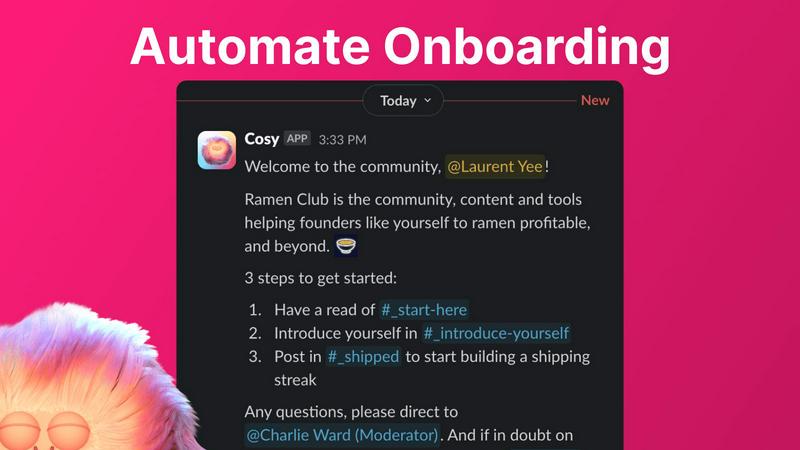
Automate Onboarding
Cosy allows you to create and automate up to 10 distinct onboarding welcome DM sequences. Whether the messages come from you, a team member, or the Cosy bot, new members will receive a warm welcome that can be customized with their names, links, emojis, and even time delays. This feature ensures that no one slips through the cracks when they join your community, even if they sign up at odd hours.
Connect Your Members
With Cosy, you can automatically introduce community members to each other via DMs, enhancing engagement and fostering connections. By customizing the frequency and timing of these introductions, you can create a vibrant network of relationships that grow organically within your community. Opted-in members are randomly selected for introductions, ensuring that everyone has the chance to connect with different people over time.
Member Directory
Cosy offers a simple, searchable directory of all your community members, allowing anyone to find and connect with others without leaving Slack. Members can customize their profiles with up to 10 custom fields, making it easier to engage and collaborate. Notifications prompt new joiners to fill out their profiles, ensuring that everyone stays informed about who is in the community.
Content Highlights
This feature lets you surface the top 10 most engaging posts in your community instantly. With a quick slash command, you can access the most engaged posts within a specific channel or across all public channels. Additionally, you can identify unreplied messages, ensuring that valuable discussions do not go unnoticed and that engagement is always encouraged.
FilexHost
Instant Subdomains
With FileXHost, you can enjoy instant subdomains for your files, such as your-file.filex.host, with zero setup required. This feature allows for immediate access and sharing without any technical barriers, making it incredibly user-friendly.
Free SSL Encryption
Every link generated through FileXHost comes with free SSL encryption, ensuring that your files are secure and protected during transit. This means you can share sensitive documents without worrying about potential breaches or data leaks.
Smart View Modes
FileXHost provides intelligent view modes that cater to different file types. You can choose between a direct render for immediate viewing or a download page for files that need to be saved. This flexibility ensures that your recipients have the best experience possible.
Optional Password Protection
For those who require an extra layer of security, FileXHost offers optional password protection and expiry settings for your links. You can tailor the access to your files by setting passwords and determining how long the files remain accessible, giving you complete control over your content.
Use Cases
Cosy
Streamlining Onboarding Processes
For community managers, onboarding new members can be a tedious task. Cosy automates this process, ensuring that each new member receives a personalized welcome message, thus saving significant time and effort. This automation allows managers to focus on building relationships and driving community initiatives.
Enhancing Member Engagement
Cosy’s automated introductions facilitate connections among community members, making it easier for individuals to meet and collaborate. This feature helps create a sense of belonging and increases overall engagement, as members are more likely to interact with others they have been introduced to.
Building a Comprehensive Member Directory
Community leaders can utilize Cosy's member directory to foster connections and facilitate networking. Members can search for others based on specific criteria, enhancing collaboration and ensuring that everyone is aware of who is in the community and what they bring to the table.
Highlighting Valuable Content
With Cosy’s content highlights feature, community managers can easily identify and promote engaging discussions. This ensures that members are aware of important conversations and encourages active participation, helping the community stay vibrant and informed.
FilexHost
Professional Report Sharing
Imagine a scenario where you need to share crucial client reports without the hassle of attaching files to emails. With FileXHost, you can simply upload the report and generate a shareable link. Your clients receive a beautifully rendered document that they can view instantly, enhancing professionalism.
Developer Hosting
Developers often need to showcase landing pages or mock APIs to clients and stakeholders. FileXHost makes this process seamless, allowing you to host entire websites or web projects effortlessly. Just upload your files, and you’re ready to demonstrate your work without the need for complex deployments.
Creative Distribution
For creators distributing digital products like eBooks, photography, or design assets, FileXHost serves as the perfect platform. You can upload your creative work and share it with your audience using secure links, ensuring that they receive it in the best possible format without attachments or download delays.
Friction-Free File Delivery
Anyone who has struggled with "request access" emails or file attachment limits knows the pain of traditional sharing methods. With FileXHost, you can provide a frictionless experience for your recipients, allowing them to access files directly through shareable links without cumbersome steps.
Overview
About Cosy
Cosy is a transformative Slack-native platform designed to elevate your standard Slack workspace into a dynamic, engaged, and self-sustaining community. It caters to community managers, founders, and leaders who value human connection yet find themselves overwhelmed with the manual tasks of onboarding new members, facilitating introductions, and curating relevant content. With Cosy, these challenges become a thing of the past. The platform automates essential processes, enabling you to save hours of effort each week while focusing on strategic initiatives and meaningful interactions. Cosy’s core value proposition is to drive deeper engagement and foster serendipitous connections right where your members are most comfortable—inside Slack. From automated welcome sequences that work around the clock to a searchable member directory and smart content highlights, Cosy cultivates a warm and efficient environment for your community to thrive organically and authentically. Imagine a workspace where every new member is greeted promptly, connections spark effortlessly, and the best conversations are always within reach—this is the journey that Cosy enables.
About FilexHost
FileXHost is your go-to solution for instant file hosting and sharing, transforming the way you handle documents, media, and websites. Designed for professionals, developers, and creators alike, it simplifies the complex process of file sharing into a streamlined "Drop & Share" experience. With FileXHost, you can drag and drop any file type—be it PDFs, spreadsheets, or entire websites—and receive a secure URL in mere seconds. You no longer have to grapple with server configurations, DNS settings, or cumbersome login requirements for recipients. The focus is on efficiency and user-friendliness, ensuring that anyone can share files effortlessly, regardless of technical expertise. Whether you are sharing client reports, showcasing creative work, or distributing digital products, FileXHost delivers high-speed hosting with a beautiful viewer experience that eliminates the frustration of traditional methods.
Frequently Asked Questions
Cosy FAQ
How does Cosy automate onboarding for new members?
Cosy allows you to set up automated welcome DM sequences that can be triggered when a new member joins your Slack workspace. You can customize messages and timing, ensuring that every new member feels welcomed immediately.
Can I customize the introduction messages sent to members?
Yes, Cosy provides customizable templates for introduction messages. You can modify the content, frequency, and timing of these introductions to suit the unique dynamics of your community.
Is there a limit to the number of custom fields in the member directory?
You can set up to 10 custom fields in the member directory. These fields can require text entry or multiple-choice answers, allowing for a personalized experience for each member.
How can I access the top engaging posts in my community?
Cosy offers slash commands that allow you to quickly surface the top 10 most engaged posts in specific channels or across all public channels. This feature makes it easy to keep track of valuable discussions and foster community engagement.
FilexHost FAQ
What is FileXHost?
FileXHost is an instant file hosting and sharing service that allows users to upload, host, and share a wide variety of file types with ease. The platform is designed to simplify the sharing process, making it accessible for everyone, from professionals to casual users.
Is it really free?
Yes, FileXHost offers a free plan that allows you to host up to 1,000 files with a maximum size of 25MB each. While this plan includes ads and a watermark, it is perfect for quick sharing and testing without any financial commitment.
What file types are supported?
FileXHost supports a wide array of file types, including documents (PDF, RTF, TXT), spreadsheets (XLSX, CSV, JSON), images (JPG, PNG, WEBP), media files (MP4, MP3), and archives (ZIP). This versatility makes it an excellent choice for various use cases.
How do I update my site?
Updating your hosted files on FileXHost is as simple as uploading a new version of your file. The platform generates a new link if required, ensuring that your recipients always have access to the latest version without any complicated processes.
Alternatives
Cosy Alternatives
Cosy is an innovative platform designed to enhance Slack workspaces by transforming them into dynamic communities. This tool streamlines the onboarding process and automates member introductions, helping community managers and leaders foster deeper connections among their members. Users often seek alternatives to Cosy for various reasons, including budget constraints, the need for additional or specific features, or compatibility with other platforms they may be using. When exploring alternatives, consider key factors such as the ability to customize onboarding experiences, the efficiency of member engagement tools, and how well the platform integrates with existing workflows. It's crucial to find a solution that not only meets your current needs but also has the potential to grow alongside your community.
FilexHost Alternatives
FilexHost is a powerful tool designed to simplify the file hosting and sharing experience. As a productivity and management solution, it allows users to seamlessly store and distribute a variety of file types, from documents to media, with just a simple drag and drop. The convenience of instant sharing through secure URLs makes it a favorite among professionals and creators alike. However, users often seek alternatives to FilexHost for various reasons, such as pricing structures, specific feature requirements, or different platform compatibilities. When searching for an alternative, it’s essential to consider factors like storage limits, security features, ease of use, and the ability to customize sharing options to better fit individual or organizational needs. Finding a solution that aligns with your specific file-sharing goals can greatly enhance your overall experience.