
Code Word Solver - Missing Words Finder vs PseudoRun
Side-by-side comparison to help you choose the right product.

Code Word Solver - Missing Words Finder
Unlock the secrets of codewords effortlessly with our intuitive solver, guiding you to the answers you seek.
Last updated: February 27, 2026

PseudoRun
Master IGCSE pseudocode for free with our ad-free editor and real-time simulator.
Last updated: March 1, 2026
Visual Comparison
Code Word Solver - Missing Words Finder

PseudoRun
Feature Comparison
Code Word Solver - Missing Words Finder
Single Pattern Solving
This feature allows you to enter a single word pattern and receive a list of matching word candidates. By inputting what you already know, the solver narrows down the possibilities, giving you a clear path forward. This is particularly useful when you're stuck and need a hint to progress without compromising your puzzle-solving integrity.
Multi-Pattern Solving
With the multi-pattern solving feature, you can enter two patterns simultaneously, enabling you to solve linked words side-by-side. This is beneficial when the same letter-number relationships appear across different words, facilitating a more comprehensive approach to solving complex puzzles. It allows for greater efficiency and ensures that you are considering all possible connections.
Flexible Input Options
The Code Word Solver offers versatile input options that cater to your specific needs. You can use periods or question marks to represent unique unknown letters and numbers for repeated unknown letters, ensuring the solver maintains consistency. For example, entering "112.2" would help you find words like "llama," making the process intuitive and user-friendly.
Customizable Difficulty Dictionaries
Recognizing that not all players are the same, the tool provides different dictionary sizes tailored to various skill levels. You can choose from hard (260k words), normal (115k words), or easy (20k words) dictionaries, ensuring that your puzzle-solving experience is perfectly matched to your capabilities and preferences.
PseudoRun
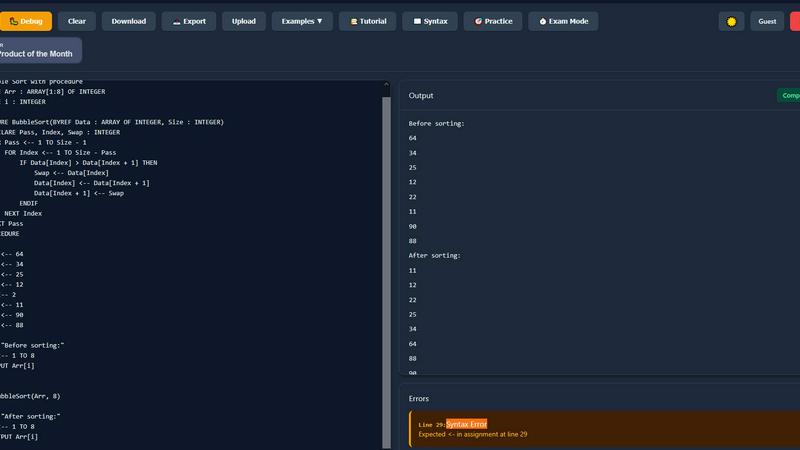
IGCSE Exam-Focused Editor
This isn't a generic coding tool; it's an environment built from the ground up for your syllabus. Every command, structure, and keyword is 100% aligned with the official Cambridge IGCSE Computer Science pseudocode specification. This means you practice exactly what you'll be tested on, writing pseudocode that examiners expect to see, eliminating guesswork and building muscle memory for the real exam paper.
Real-Time Validation & Error Detection
Gone are the days of writing an entire algorithm only to find a cryptic error at the end. As you type, PseudoRun acts as an instant guide, checking your syntax and highlighting mistakes in real-time. This immediate feedback loop is like having a teacher looking over your shoulder, helping you learn from errors as you make them and fostering the ability to write perfect, efficient pseudocode from the first draft.
Step-by-Step Interactive Debugger
True understanding comes from seeing how your code thinks. Our powerful debugger allows you to execute your pseudocode line-by-line, watching in real-time as variables change their values, loops iterate, and decisions are made. This visual journey through your algorithm's logic demystifies complex processes, transforming abstract concepts into clear, traceable steps and building deep, intuitive comprehension.
Comprehensive IGCSE Practice Library
Mastery requires practice with purpose. PseudoRun provides a vast, built-in library of 50+ IGCSE-style examples and exercises. Categorized by key topics like arrays, procedures, file handling, and searching algorithms, this library offers structured learning paths from fundamental concepts to advanced exam problems, giving you the targeted practice needed to tackle any question with confidence.
Use Cases
Code Word Solver - Missing Words Finder
Quick Problem-Solving for Casual Players
Casual players can use the Code Word Solver to quickly find answers when they encounter tricky puzzles. By inputting known letters and patterns, players can receive immediate suggestions, allowing them to continue enjoying their favorite puzzles without interruption.
Enhancing Competitive Play
For those who engage in competitive puzzle-solving, this tool becomes an invaluable asset. It enables players to solve puzzles faster than their opponents by providing accurate word candidates based on their known patterns, giving them a competitive edge in puzzle competitions.
Educational Tool for Students
Teachers and students can utilize the Code Word Solver as an educational resource. By encouraging students to learn letter-number associations and word patterns, it fosters critical thinking and improves vocabulary skills while making learning fun and interactive.
Community Engagement through Word Submission
Puzzle enthusiasts can contribute to the tool's growth by submitting new words and definitions. This feature encourages community engagement and ensures that the database remains up-to-date with a diverse range of words, continuously enhancing the user experience for all.
PseudoRun
From Theory to First Successful Program
For a student staring at a textbook diagram of a flowchart, the leap to writing code can be paralyzing. PseudoRun is the perfect first step. Start with a simple example from the library, modify it in the guided editor, and hit 'Run' to see it work instantly. This immediate, positive reinforcement builds the foundational confidence that turns theoretical knowledge into practical skill.
Systematic Exam Preparation and Revision
In the weeks leading up to the exam, focused practice is key. Students use PseudoRun to methodically work through past paper problems and topic-specific exercises in the practice library. The exam-mode timer simulates real pressure, while the ability to save and revisit programs allows for creating a personalized revision portfolio of challenging algorithms.
Debugging and Mastering Complex Algorithms
When a self-written program for a binary search or a nested loop doesn't produce the expected output, frustration sets in. Instead of giving up, students use the step-by-step debugger to walk through their logic. Watching variable values update line-by-line illuminates the flaw in the algorithm, turning a moment of confusion into a powerful, lasting lesson in logical thinking.
Collaborative Learning and Classroom Integration
Teachers integrate PseudoRun into their lessons to demonstrate algorithms live in class, using the debugger to visualize processes. Students then use the platform for homework, sharing their unique program links for review. This creates an interactive learning loop where concepts taught can be immediately practiced and assessed in a standardized, exam-focused environment.
Overview
About Code Word Solver - Missing Words Finder
Code Word Solver - Missing Words Finder is an innovative tool designed to enhance your experience with codeword puzzles. Whether you are a casual player or a dedicated puzzle enthusiast, this tool streamlines the process of solving challenging code-cracker puzzles. Instead of relying on guesswork, you can input known patterns and let the solver do the heavy lifting, reducing frustration and increasing your chances of success. The tool works by mapping letters to numbers (1-26), allowing you to decode the grid confidently once you identify a letter's corresponding number. With options for single or multiple pattern solving, you can tackle puzzles with ease, making it the ideal companion for anyone looking to sharpen their problem-solving skills. The Code Word Solver empowers you to decode puzzles faster, ensuring that you can enjoy your favorite pastime without the stress of stumbling through unknowns.
About PseudoRun
Every IGCSE Computer Science student knows the feeling: you understand the theory of loops and arrays, but when you sit down to write your first line of pseudocode, the page stares back, blank and intimidating. That was the exact moment of frustration that sparked the creation of PseudoRun. Born from a student's struggle with clunky software and distracting, ad-ridden platforms, PseudoRun is a sanctuary built for one purpose: to bridge the chasm between understanding and doing. It is the #1 free, online platform dedicated exclusively to helping you master Cambridge IGCSE pseudocode. Think of it as your personal, patient tutor—a clean, interactive editor where you can write, run, and debug pseudocode in real-time, perfectly aligned with your exam specification. We removed every barrier we once faced: no complex installations, no confusing errors without explanation, and absolutely no ads or paywalls. It's a focused journey where over 10,000 students have turned the anxiety of algorithms into the achievement of exam-ready confidence, one line of logical, validated code at a time.
Frequently Asked Questions
Code Word Solver - Missing Words Finder FAQ
How does Code Word Solver work?
The Code Word Solver works by allowing you to input known letter patterns, using symbols for unknown letters. It filters potential matches based on the information you provide, making it easier to find the correct words.
Can I use the solver for different difficulty levels?
Yes, the tool offers multiple dictionary sizes tailored to different skill levels. You can choose from hard, normal, or easy dictionaries to match your experience with codeword puzzles.
What should I do if I find a word that isn't in the database?
If you encounter a word not present in the database, you can submit it to the Code Word Solver community. This feature helps improve coverage over time, ensuring that the tool remains comprehensive and useful for all users.
Are there any tips for using the pattern input effectively?
To use the pattern input effectively, enter known letters and use periods or question marks for unique unknown letters. For repeated unknown letters, use numbers, such as "112.2" for words like "llama." This structured input helps the solver generate accurate results.
PseudoRun FAQ
Is PseudoRun really completely free?
Yes, absolutely. PseudoRun was built to remove financial barriers to education. We promise zero ads, forever, and all features—including the editor, debugger, cloud storage, and practice library—are completely free. Our mission is purely to support IGCSE student success without any hidden costs or premium paywalls.
How does PseudoRun help with the actual IGCSE exam?
PseudoRun is meticulously aligned with the Cambridge IGCSE pseudocode standard. By practicing here, you are writing the exact style of pseudocode required in the exam. The platform builds the speed, accuracy, and logical fluency needed to interpret and write exam questions efficiently, while the timed exam mode prepares you for the pressure of the real test environment.
Do I need to download software or create an account?
No download and no account are required to start. You can begin writing and running pseudocode instantly by visiting the website—a conscious design choice to eliminate setup friction. You can optionally create a free account to save your programs to the cloud and access them from any device, but it's not mandatory to try the core features.
Can I use PseudoRun on my phone or tablet?
Yes, PseudoRun is a fully responsive web application. The clean, focused interface works seamlessly on desktops, laptops, tablets, and smartphones. This allows you to practice pseudocode anytime, anywhere—whether you're revising between classes or doing a last-minute review on the go before your exam.
Alternatives
Code Word Solver - Missing Words Finder Alternatives
Code Word Solver - Missing Words Finder is a specialized online tool designed to assist puzzle enthusiasts in decoding challenging codeword puzzles. This tool falls under the category of puzzle-solving aids, providing users with intuitive features to simplify the process of cracking codes. As players engage with increasingly complex puzzles, they often seek alternatives that may offer different pricing structures, enhanced features, or compatibility with various platforms. When exploring alternatives, it's essential to consider aspects such as the range of word databases available, the user interface experience, and the ability to customize difficulty levels. A good alternative should not only meet the user's immediate needs but also provide a seamless experience that enhances their puzzle-solving journey.
PseudoRun Alternatives
PseudoRun is a dedicated, free platform in the educational technology space, designed specifically to help IGCSE Computer Science students master exam-standard pseudocode. It provides a focused, ad-free environment to write, test, and debug algorithms in real-time, perfectly aligned with the Cambridge syllabus. Students often explore other options for various reasons. Some may seek platforms with broader programming language support beyond pseudocode, while others might prioritize mobile app accessibility or different teaching methodologies. The need can stem from a desire for more advanced features, collaborative tools, or simply a different interface style. When evaluating other platforms, it's crucial to consider alignment with the IGCSE specification above all else. Look for real-time error checking that provides immediate, constructive feedback. A clean, distraction-free interface is also key, as it allows you to focus purely on building the logical thinking skills essential for exam success, without the clutter of ads or unnecessary complexity.