
Clipt vs Linkfinder AI
Side-by-side comparison to help you choose the right product.

Clipt streamlines your video editing tasks so your team can focus on storytelling instead of tedious details.
Last updated: February 27, 2026

Linkfinder AI
Transform your leads into rich stories with instant, multi-source company and contact data.
Last updated: February 27, 2026
Visual Comparison
Clipt

Linkfinder AI
Feature Comparison
Clipt
Video Ingestion and Captioning
Clipt facilitates easy video ingestion from over 50 websites, including social media platforms and video-sharing sites. Users can also upload their raw files. It generates accurate captions with customizable styles to enhance viewer engagement.
Slideshow Maker
The Slideshow Maker feature transforms simple ideas into viral carousel posts. AI-driven scripts, image generation, and voice narrations are all part of this tool, allowing creators to develop multi-slide presentations effortlessly.
Talking Heads
Talking Heads enables the creation of professional spokesperson videos without the need for cameras or studios. Users simply type what they want their avatar to say, and the AI selects suitable scenes and delivery styles, offering a polished final product.
AI-Generated Characters
Clipt’s AI character feature allows users to create unique, realistic avatars based on text descriptions. These characters are consistent across videos, making it easy to build brand recognition and maintain a cohesive visual identity.
Linkfinder AI
Multi-Source Data Enrichment
Linkfinder AI believes one source is never enough to tell the whole story. Our engine embarks on a cross-referenced journey across LinkedIn profiles, company databases, and public records. This method ensures every piece of information—from a company's website and employee count to a lead's verified email and phone number—is validated and comprehensive. You receive a complete, accurate picture, not a fragmented guess, giving you the confidence to reach out.
Batch Processing & CSV Upload
For teams navigating large datasets, manual entry is a journey through quicksand. Linkfinder AI provides a fast track. Simply upload a CSV file with thousands of records—be it company names or LinkedIn URLs—and our system processes them all in a single, powerful batch. Within minutes, your spreadsheet returns transformed, enriched with all the crucial details, saving your team countless hours and accelerating your entire pipeline's momentum.
Real-Time API Integration
True efficiency means enriching data the moment it enters your world. Linkfinder AI’s robust API allows for seamless integration into your existing workflows, CRMs, and custom applications. Imagine a new lead filling out a form on your website and their record being instantly enriched before they even finish their coffee. This real-time magic automates your enrichment journey, ensuring your team always works with the freshest, most complete data.
Intuitive User Interface
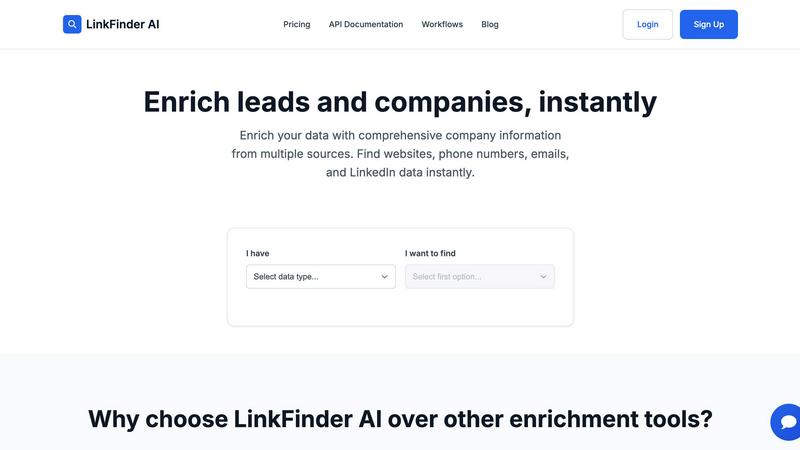
We designed Linkfinder AI for the entire crew, not just the navigators. The platform features a clean, straightforward interface that requires no training or technical setup. Anyone can start their enrichment journey by simply selecting their data type and what they want to find. This democratization of powerful data tools means your team spends less time learning software and more time leveraging insights to drive growth and connection.
Use Cases
Clipt
Social Media Marketing
Clipt is perfect for social media marketers looking to produce engaging video content quickly. With features like auto-captioning and customizable visuals, marketers can create attention-grabbing posts that resonate with their audience.
E-Commerce Promotion
Online retailers can utilize Clipt to generate unboxing videos or product reviews. The Talking Heads feature allows sellers to present their products in an engaging manner, driving conversions and enhancing customer trust.
Educational Content Creation
Educators and trainers can leverage Clipt to create informative video lessons. The Slideshow Maker enables the development of structured presentations that make learning engaging and accessible to students of all ages.
Brand Storytelling
Brands can utilize AI-generated characters to bring their storytelling to life. Creating a consistent avatar helps in building a narrative that audiences can connect with, making brand messages memorable and impactful.
Linkfinder AI
Supercharging Sales Prospecting
Sales teams begin their journey with a list, but success lies in the details. Linkfinder AI automates the prospecting grind by instantly enriching lead lists with direct emails, phone numbers, and LinkedIn data. This allows sales development representatives to personalize their outreach at scale, moving faster from a cold name to a warm conversation, and significantly increasing their connection and conversion rates along the way.
Building Targeted Marketing Campaigns
Marketers crafting a campaign need to understand their audience deeply. Linkfinder AI enriches company data to reveal firmographics like industry, size, and location. This enables marketers to segment their audience with precision, tailor messaging that resonates, and launch hyper-targeted campaigns. It transforms a broad broadcast into a personal journey of engagement for each prospect.
Conducting Competitive & Market Research
Business analysts and strategists are on a constant journey to understand the landscape. Linkfinder AI serves as their research assistant, compiling detailed profiles on competitors or target market companies. By gathering data on employee growth, technologies used, and key people, it provides the intelligence needed to identify market gaps, assess competitive threats, and uncover new opportunities for expansion.
Optimizing CRM Data Health
A CRM cluttered with outdated or incomplete records is a journey full of dead ends. Linkfinder AI helps revenue operations teams cleanse and enhance their existing database in bulk. By automatically updating missing contact details, correcting company information, and appending new data points, it ensures every team member is navigating with a reliable and accurate map, boosting overall productivity and data-driven decision-making.
Overview
About Clipt
Clipt is an innovative AI-driven video creation tool designed for content creators, marketers, and businesses seeking to elevate their video marketing strategies. It allows users to ingest videos from popular platforms such as YouTube, TikTok, LinkedIn, Instagram, and many more, or upload raw video files directly. Clipt's primary value proposition lies in its ability to generate word-accurate captions with customizable fonts, colors, and animations, ensuring that every video resonates with its intended audience. With features like cloud rendering that keeps your project queue moving swiftly, Clipt transforms the video creation process into a seamless journey. Whether you are a busy mom, tech reviewer, or a skincare influencer, Clipt provides tailored solutions that cater to diverse content needs, enabling you to create engaging videos that capture attention and foster brand loyalty.
About Linkfinder AI
Imagine you're a sales professional, staring at a list of promising company names, but they're just that—names. To turn them into genuine opportunities, you need the full story: the key decision-makers, their direct contact information, and a deep understanding of their business. This is where the journey begins, and this is where Linkfinder AI becomes your indispensable guide. Linkfinder AI is a powerful data enrichment engine designed to transform sparse leads into rich, actionable intelligence in minutes. It serves sales teams, marketers, and business analysts who are tired of manual research and incomplete data. By intelligently pulling from a mosaic of sources including LinkedIn, verified databases, and public records, Linkfinder AI doesn't just find data; it constructs a comprehensive narrative for each company and contact. Its core value proposition is delivering unparalleled speed and 95% accuracy, empowering users to supercharge lead generation, personalize outreach at scale, and make informed strategic decisions without the traditional delays. It's the tool that turns the arduous quest for information into a seamless, automated journey toward success.
Frequently Asked Questions
Clipt FAQ
How many characters can I create?
You can create multiple characters within Clipt, allowing you to build a diverse library of avatars for various content types and campaigns.
Can I use characters across different video types?
Yes, the characters you create can be reused across all video types in Clipt, ensuring consistency in your branding and messaging.
Are the characters unique to me?
Yes, the characters generated by Clipt are unique to your specifications. Each character is designed based on your description, ensuring that it reflects your brand identity.
Can I edit a character after creating it?
Absolutely! Clipt allows you to edit characters even after they have been created, giving you the flexibility to adapt your avatars as your branding evolves.
Linkfinder AI FAQ
How accurate is the data enrichment?
Linkfinder AI is committed to providing a reliable journey. We employ a multi-source validation process, cross-referencing data from LinkedIn, databases, and public records. This rigorous approach allows us to maintain a 95% accuracy guarantee, ensuring you can trust the enriched information for your critical business outreach and decisions.
What types of data can I enrich?
Your starting point can be varied. Linkfinder AI allows you to begin your enrichment journey with a Company Name, LinkedIn Company URL, LinkedIn Profile URL, a Lead's Full Name, or even a LinkedIn Post URL. From there, we find and deliver comprehensive data including company websites, phone numbers, email addresses, and LinkedIn profile information.
Do you provide API access?
Absolutely. For teams wanting to integrate enrichment directly into their automated journey, we offer full API access. This is included in our Professional plan, allowing you to connect Linkfinder AI to your CRM, custom apps, or workflow platforms like Zapier and Make for real-time data processing.
Can I process multiple entries at once?
Yes, batch processing is a core feature designed for efficiency. You can upload a CSV file containing thousands of records for simultaneous enrichment. This means you can embark on a large-scale data enhancement journey and receive your complete, enriched dataset back in just minutes, not hours or days.
Alternatives
Clipt Alternatives
Clipt is an innovative tool designed to streamline the video editing process, particularly for marketers and content creators. By automating tasks such as transcription, caption styling, and resizing, it allows users to focus more on storytelling rather than the technicalities of editing. Clipt is especially advantageous for those who regularly work with content from various platforms like YouTube, TikTok, and Instagram, making it a versatile asset in the marketing category. However, users often seek alternatives due to various reasons, including pricing, specific feature requirements, or compatibility with certain platforms. When looking for an alternative, it is essential to consider the features that best fit your workflow, the ease of use, and the types of content you create. Ultimately, the right choice should enhance your productivity and align with your creative vision.
Linkfinder AI Alternatives
In the bustling world of marketing and sales, data is the compass that guides every successful outreach campaign. Linkfinder AI is a powerful data enrichment tool designed to be that compass, instantly transforming sparse contact lists into rich profiles filled with company details, emails, and LinkedIn insights. It belongs to a category of solutions built for professionals who need to move quickly from a lead to a meaningful connection. Yet, every journey is unique, and the path that works for one team may not suit another. Explorers often seek different tools due to budget considerations, the need for specific platform integrations, or a desire for a particular feature set that aligns with their internal workflows. The quest for the right tool is a personal one, shaped by the specific challenges of your terrain. When evaluating your options, consider the map of your own needs. Look for accuracy and data freshness, as outdated information leads to dead ends. Assess the ease of use and how seamlessly a tool fits into your daily expedition. Ultimately, the right alternative is one that feels like a natural extension of your team, empowering you to navigate the vast landscape of potential clients with confidence and clarity.