
AutomagicWP vs QRKit
Side-by-side comparison to help you choose the right product.

Stop manually updating every WordPress site and let one upload seamlessly push updates everywhere.
Last updated: March 4, 2026

Start your journey with QRKit, creating dynamic codes you can edit and track forever.
Last updated: March 1, 2026
Visual Comparison
AutomagicWP

QRKit
Feature Comparison
AutomagicWP
One-Click Release Management
Forget messy folders of ZIP files. With AutomagicWP, you upload a plugin or theme ZIP once, and it instantly becomes a structured release. The system parses the version, name, and author, creating a clean version history with timestamps. You can manage PHP requirements, attach detailed changelogs, and pull down any previous version whenever you need—all from a single, organized dashboard. This turns chaotic file management into a reliable, professional release pipeline.
Truly Automatic Site Updates
This is the core magic. After connecting a client's WordPress site with a simple API key, your job is done. When you publish a new release on AutomagicWP, each connected site will discover the update on its own schedule, just like it does with plugins from WordPress.org. The update happens in the background, seamlessly. You get a clear overview showing exactly which sites have updated, eliminating all guesswork and manual logins.
Professional Plugin Repository
Give your plugins the presence they deserve. AutomagicWP acts as your private plugin directory, allowing you to upload icons, banners, and screenshots that display within the wp-admin of your clients' sites. You can craft full descriptions, FAQs, and detailed update changelogs that users can read before updating. This elevates your work from a simple code package to a professionally presented product.
CI/CD & GitHub Integration
Integrate updates directly into your modern development workflow. Connect your GitHub repository and AutomagicWP will automatically build and release a new version whenever you push a tag. With the included GitHub Action, you can go from merging code to deploying an update across all sites without a single manual step, making continuous delivery for WordPress not just possible but effortless.
QRKit
Dynamic QR Codes
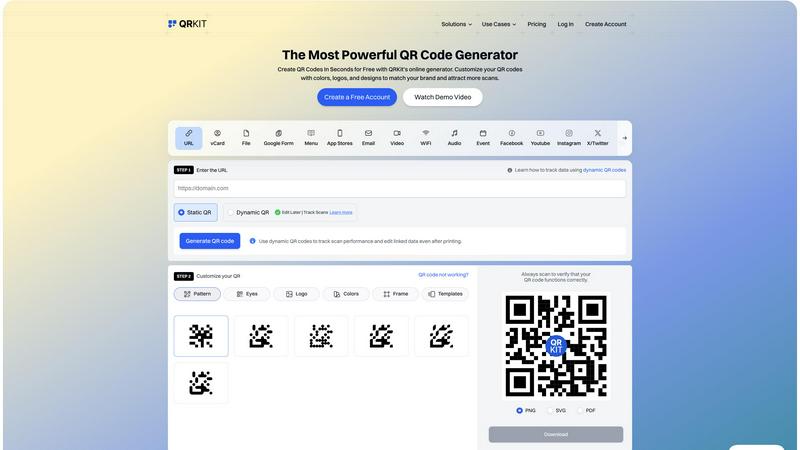
Picture this: you've placed a QR code on a restaurant tabletop linking to your menu. With a traditional static code, you're locked in. But with QRKit's Dynamic QR Codes, you hold the key to change. You can update the destination URL anytime—switch from a lunch to a dinner menu, promote a daily special, or even redirect to a reservation page—all without ever touching the printed code. This feature liberates you from the fear of outdated information, making your printed materials permanently relevant and your campaigns infinitely flexible.
Advanced Scan Analytics
Every scan tells a story, and QRKit gives you the book. When someone interacts with your QR code, the platform captures valuable data, transforming a simple scan into a rich insight. Track the total number of scans in real-time, view geographic locations on a map, identify the devices and operating systems used, and analyze scan trends over time. This narrative of customer engagement allows you to measure campaign ROI, understand your audience's behavior, and make data-driven decisions to optimize your offline-to-online strategy.
Custom Design Studio
Your QR code shouldn't just function; it should reflect your brand's personality. QRKit's design studio is your creative playground. Move beyond standard black and white squares. Customize the pattern style, eye shapes, and colors to match your brand palette. Upload your logo to sit proudly in the center, add a stylish frame with a call-to-action, or choose from elegant templates. This feature ensures your QR codes are not just scannable but are visually compelling brand assets that people want to engage with.
Bulk QR Code Creation
For businesses managing large-scale campaigns, creating codes one by one is a chapter best skipped. QRKit's bulk creation tool lets you write the entire story at once. Simply upload a CSV file containing your destinations—like hundreds of product URLs or event pages—and the platform will generate a complete set of QR codes in a single action. You can apply a unified custom design to all of them and download the entire batch, saving you hours of manual work and ensuring consistency across your materials.
Use Cases
AutomagicWP
The WordPress Agency
Agencies managing portfolios of 20, 50, or 100+ client sites face an update nightmare. AutomagicWP is their central command center. They deploy a custom plugin or theme to all client sites from one place, ensuring consistency, saving countless billable hours on manual updates, and providing clients with a seamless, professional update experience that enhances trust and retention.
The Independent Plugin Developer
Solo developers and small shops creating premium plugins need a reliable, white-label distribution channel. AutomagicWP provides exactly that, without the overhead of building a custom update server or managing an e-commerce platform. They get automatic updates, professional presentation, and a simple way to serve their customers, allowing them to focus entirely on development.
The Freelancer Escaping Repetition
Freelancers tired of the repetitive, non-billable task of manually updating each client's site find freedom with AutomagicWP. It automates the entire distribution process, turning what was a weekly chore into a set-and-forget system. This gives them back hours each week to take on new projects or deepen their skills.
The Product Team with Modern Workflows
Development teams using GitHub and CI/CD practices need their WordPress tools to keep up. AutomagicWP fits perfectly into this pipeline. They can automate releases directly from their version control, ensuring that every tagged commit is instantly available to all end-users, enforcing rigorous and reliable deployment practices.
QRKit
Restaurants & Hospitality
The journey from a diner's seat to your digital menu should be effortless. Restaurants use QRKit to create beautiful, scannable codes for contactless menus placed on tables or windows. The dynamic nature means the menu can be updated instantly for daily specials or seasonal changes. Furthermore, codes can link to reservation systems, feedback forms, or loyalty program sign-ups, creating a seamless and modern dining experience that keeps customers engaged and information current.
Marketing & Promotional Campaigns
A marketer's campaign is a living story, and QRKit provides the editable pages. Imagine a QR code on a poster for a summer sale. With QRKit, after the sale ends, you can redirect that same code to a new winter collection launch or a contest entry page. The ability to track scans provides the climax to the story, showing exactly which posters or locations drove the most engagement, allowing for precise measurement of offline ad spend and audience interest.
Events & Conferences
The journey of an event attendee is filled with moments of connection. QRKit streamlines this path. Use it for quick event check-ins, linking to digital agendas, speaker bios, or feedback surveys. A dynamic code on a welcome packet can be updated daily with schedule changes or networking opportunities. This not only enhances the attendee experience but also gives organizers invaluable data on participation and engagement across different sessions or activities.
Retail & E-commerce
Bridge the gap between a physical product on a shelf and the rich digital world. Retailers place QRKit codes on product packaging or in-store displays to link directly to detailed product pages, video tutorials, customer reviews, or exclusive online offers. The dynamic feature allows the destination to be updated for new promotions or product launches, while analytics reveal which products or in-store locations are generating the most digital traffic and interest.
Overview
About AutomagicWP
Imagine the story of a WordPress developer, let's call her Sarah. Every time she perfected a new feature or squashed a bug in her custom plugin, her work was only half done. The real marathon began: logging into dozens of client dashboards, one by one, uploading the same ZIP file, clicking the same buttons, over and over. It was a soul-draining loop that stole hours from her week, hours she could have spent building something new. This is the story AutomagicWP was born to end. It is your private, automated distribution hub, designed to transform plugin and theme updates from a manual chore into a seamless, silent process. You simply upload a new release once to your AutomagicWP dashboard. Then, like magic, every WordPress site you've connected updates itself automatically, using WordPress's own native update system. This journey isn't just about saving time; it's about reclaiming your focus, delivering professional updates to your clients effortlessly, and scaling your development workflow without the friction. It's the trusted companion for WordPress agencies, solo developers escaping the "ZIP loop," and creators who need a polished, professional distribution channel without the complexity of a full-scale platform.
About QRKit
Imagine printing a thousand flyers for a grand opening, only to realize the website link has a typo. In the traditional world of QR codes, that would be a costly mistake, leading to wasted materials and missed connections. QRKit was born from a simple, powerful idea: what if your QR code could evolve with you? This is the story of a platform that transforms static black-and-white squares into dynamic, intelligent gateways. QRKit is an all-in-one creative studio and analytics dashboard for QR codes, designed for business owners, marketers, educators, and creators who believe their first impression should be as adaptable as their latest idea. At its heart, QRKit solves the fundamental frustration of permanence. It empowers you to create Dynamic QR Codes—codes you can edit, update, and refine anytime, long after they've been printed on menus, product packaging, or billboards. This means your marketing never grows stale and your information is always current. But the journey doesn't end at creation. QRKit provides a window into the impact of your offline efforts with detailed scan analytics, tracking not just how many scans you get, but where, when, and on what devices they happen. With over 20 types of codes to choose from—from WiFi passwords and digital menus to vCards and app store links—and a suite of customization tools to make each code uniquely yours, QRKit is more than a generator; it's your partner in building seamless, measurable bridges between the physical and digital worlds. Start for free, and begin writing a new chapter in how you connect.
Frequently Asked Questions
AutomagicWP FAQ
What is AutomagicWP?
AutomagicWP is a private distribution platform built specifically for WordPress plugins and themes. It acts as your own automated update server. Instead of manually uploading files to multiple websites, you publish a release once on AutomagicWP. Every WordPress site you've connected will then pull and install that update automatically through the standard WordPress update mechanism, saving you immense time and effort.
How does automatic plugin updating work?
You install a small connector plugin on each client's WordPress site and link it to your AutomagicWP account with a unique API key. This connection allows the site to securely check your private AutomagicWP repository for updates. When you publish a new release, WordPress sees it just like an update from the official directory and handles the installation automatically on its own schedule.
Is AutomagicWP free to start?
Yes, absolutely. AutomagicWP offers a free Starter plan with no credit card required to begin. This plan includes 1 plugin, storage, and full access to automatic updates and the GitHub Action. You can fully experience the automated workflow and scale up to a paid plan only when your needs grow, making it risk-free to start your journey.
Does AutomagicWP work with themes as well as plugins?
Yes, AutomagicWP is designed to handle both WordPress plugins and themes seamlessly. The same automated distribution and update process applies. You can manage and release updates for your custom themes, ensuring all client sites running your theme receive the latest features and security patches automatically, just like with plugins.
QRKit FAQ
What is a Dynamic QR Code and how is it different?
A Dynamic QR Code is a smart code where the destination information is stored on QRKit's servers, not embedded directly into the pattern itself. The code contains a short redirect link to our server, which then points to your chosen content (like a URL or file). The magic is that you can change what that final destination is at any time in your QRKit dashboard, and all existing printed codes will automatically point to the new content. A traditional static QR code has the data permanently encoded and cannot be changed once printed.
Is QRKit really free to use?
Yes, you can start your QR code journey with QRKit 100% free, with no credit card required. The free plan allows you to create dynamic QR codes that never expire, customize their design, and access basic analytics. This is perfect for individuals and small projects. For users needing advanced features like more detailed analytics, bulk creation, or team collaboration, QRKit offers paid plans with additional capabilities to scale your efforts.
What kind of scan data can I track with QRKit?
QRKit provides a narrative of each scan. You can track the total number of scans in real-time. On a map, you can see the geographic locations (city/country level) where scans originate. The dashboard also breaks down the devices used (mobile vs. desktop), the operating systems (iOS, Android, etc.), and the browsers. Furthermore, you can view a timeline of scans to see peak engagement periods, helping you understand the 'when' and 'where' of your audience's interaction.
Can I use my own logo and colors on the QR code?
Absolutely. QRKit's customization tools are designed to help your codes tell your brand's story. You can upload your company logo to be placed in the center of the code. The platform allows you to change the color of the code's data patterns and the background, letting you match your brand palette precisely. You can also select different pattern styles, eye designs, and add frames with text, ensuring your QR codes are visually cohesive with all your other marketing materials.
Alternatives
AutomagicWP Alternatives
AutomagicWP is a specialized tool in the WordPress ecosystem, designed as a private distribution hub for agencies and developers. It automates the tedious process of updating plugins and themes across multiple client sites, saving significant time and effort. Users often explore alternatives for various reasons, such as budget constraints, the need for different feature sets like built-in licensing, or a preference for platforms that are part of a larger suite of management tools. When evaluating different solutions, it's crucial to consider your specific workflow. Key factors include how the tool handles updates—whether it uses WordPress's native system for reliability or a custom method—its integration capabilities with development pipelines, and the level of control and branding it offers for your distributed software. The goal is to find a system that turns updates from a manual chore into a seamless, automated part of your process.
QRKit Alternatives
In the bustling world of marketing, QRKit stands as a powerful companion for businesses seeking to bridge the physical and digital. It’s a comprehensive platform in the QR code generation and analytics category, designed to turn simple scans into meaningful customer journeys and actionable insights. It empowers users to create dynamic, trackable codes that tell a story and adapt over time. Yet, every journey requires the right tools for its unique path. Explorers often seek alternatives to QRKit for various reasons, whether it's navigating budget constraints, needing specific integrations with other platforms, or desiring a different set of features to match their campaign's narrative. The quest is not about finding a replacement, but about discovering the tool that best aligns with your specific destination. When evaluating your options, consider the core elements of your mission. Look for a solution that offers the right balance of creative customization, reliable dynamic editing, and insightful analytics. The ideal platform should feel like a natural extension of your strategy, simplifying the connection with your audience while providing the clarity needed to understand their engagement.