
audiovideogenerator vs World Model Hub
Side-by-side comparison to help you choose the right product.

audiovideogenerator
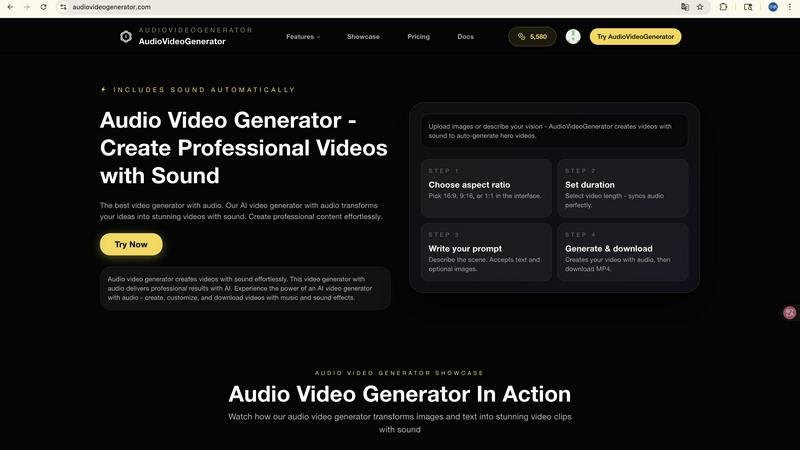
Transform your ideas into stunning videos with synchronized audio using our AI-powered video generator.

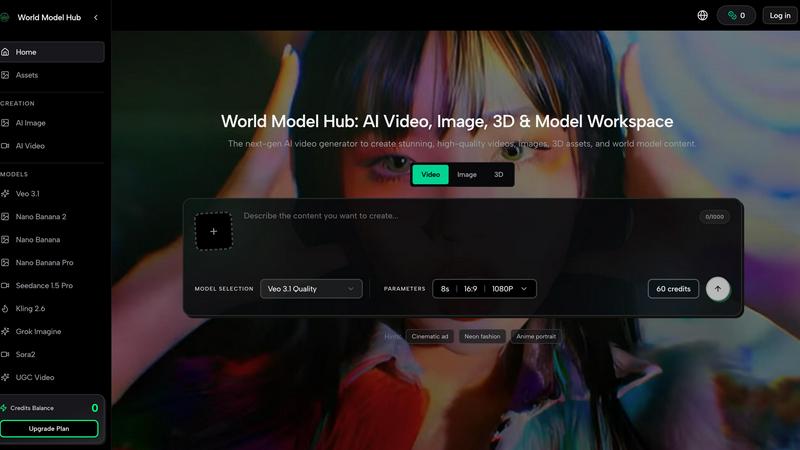
Begin your creative journey with the world's best AI models for video, image, and 3D generation in one unified workspace.
Last updated: March 26, 2026
Visual Comparison
audiovideogenerator
World Model Hub
Feature Comparison
audiovideogenerator
Text to Video with Audio
Transform your written content into dynamic videos effortlessly. The Text to Video feature uses advanced AI to generate captivating videos from text descriptions, automatically adding background music and sound effects that enhance the narrative and engage viewers.
Image to Video with Audio
Bring your static images to life with the Image to Video feature. This innovative tool allows users to convert still images into vibrant videos, complete with synchronized audio, background music, and sound effects, making it perfect for presentations or storytelling.
Automatic Audio Generation
One of the standout features of AudioVideoGenerator is its Automatic Audio Generation capability. This feature intelligently adds background music, sound effects, and ambient audio to videos, ensuring that every visual element is complemented by a rich auditory experience, enhancing overall viewer engagement.
Versatile Video Styles
AudioVideoGenerator supports a variety of video styles tailored to different needs. Whether you are creating marketing videos, educational tutorials, or social media content, the platform provides optimized outputs that cater to specific platforms and audiences, ensuring maximum impact.
World Model Hub
Unified Model Hub
Navigate the entire ecosystem of cutting-edge AI models without ever leaving the platform. World Model Hub provides centralized access to top-tier video generators like Seedance 2.0 and Kling Motion Control, powerful image models such as Nano Banana Pro, and advanced 3D creators like Hunyuan 3D. This eliminates the constant, time-consuming context-switching between different developer sites and applications, creating a cohesive environment for all your generative needs.
Comparative Creation & Iteration
Different models excel at different styles and tasks. This feature allows you to pit the giants against each other, generating assets from the same prompt across multiple models like Sora 2 and Veo 3.1 side-by-side. This direct comparison empowers you to make informed, quality-driven choices, refine your prompts based on visual feedback, and iterate rapidly to find the perfect output for your specific project's narrative and aesthetic requirements.
Production-Ready Workflow Organization
World Model Hub is built for real projects, not just one-off experiments. It provides the tools to keep your creative journey organized from the initial prompt to the final asset. Manage your prompts, reference images, generated outputs, and project iterations in a structured workspace. This repeatable process is essential for teams and professionals who need consistency, version control, and the ability to scale their AI content creation efficiently.
Ready-to-Use Creative Effects
Jumpstart your creativity and overcome prompt block with a library of popular, pre-configured creative effects. These curated starting points for AI video and image generation provide instant inspiration and professional styling, helping you quickly achieve specific looks like "Cinematic ad" or "Neon fashion" without deep technical prompting, accelerating the initial phases of your creative exploration.
Use Cases
audiovideogenerator
Social Media Content Creation
Elevate your social media presence with engaging videos created using AudioVideoGenerator. This tool allows for the quick production of videos optimized for platforms like Instagram, TikTok, and YouTube, complete with professional audio, ensuring your content stands out.
Marketing Videos
Marketers can harness the power of AudioVideoGenerator to create compelling promotional videos. By integrating background music and sound effects, users can design impactful advertisements and product showcases that resonate with their audience and drive conversions.
Educational Content Development
Transform traditional learning materials into interactive video lessons with AudioVideoGenerator. This platform makes it easy for educators to create engaging tutorials and presentations, enhancing the learning experience with relevant audio elements that facilitate comprehension.
Event Highlights and Recaps
Capture the essence of your events with memorable highlight reels created through AudioVideoGenerator. The platform enables users to generate dynamic recap videos that include synchronized background music, encapsulating the energy and emotions of significant moments.
World Model Hub
Marketing & Advertising Campaigns
Craft stunning, consistent visual assets for entire campaigns from a single platform. Generate hero videos with Veo 3.1, product images with Nano Banana, and supporting 3D visuals—all while maintaining a unified brand aesthetic. The comparison tool ensures you select the highest-quality output for each channel, from social media clips to website banners, streamlining the entire content production pipeline.
E-commerce Content Creation
Rapidly produce vast catalogs of high-quality product visuals and lifestyle videos. Use the platform to generate multiple angles, styles, and contextual scenes for products without costly photoshoots. The organized workflow allows e-commerce teams to manage batches of assets efficiently, ensuring visual consistency across thousands of SKUs and iterating on visuals based on performance data.
Creative Storytelling & Film Pre-visualization
Visualize scenes and narratives before a single physical camera rolls. Filmmakers and storyboard artists can use models like Sora 2 and Kling 3.0 to generate dynamic video sequences from script excerpts, experimenting with tone, lighting, and motion. This use case turns the platform into a powerful pre-visualization sandbox, allowing for creative exploration and alignment long before production begins.
Game Development & 3D Asset Prototyping
Accelerate the game development pipeline by quickly generating concept art, texture ideas, and prototype 3D models. Artists can use the image models for environment concepts or character sketches and then leverage 3D generators to build basic asset forms. This rapid iteration cycle enables faster brainstorming and prototyping, helping teams solidify artistic direction and asset requirements early in the development journey.
Overview
About audiovideogenerator
AudioVideoGenerator is an innovative AI-powered platform designed to revolutionize the way videos are created by seamlessly integrating audio elements. This cutting-edge tool empowers content creators, educators, marketers, and hobbyists to craft stunning professional videos that not only look great but sound exceptional. With AudioVideoGenerator, users can effortlessly generate videos enriched with background music, voiceovers, and sound effects that perfectly align with their visuals, ensuring a cohesive viewing experience. The platform caters to a diverse array of video styles, including promotional clips, social media content, educational tutorials, and narrative storytelling. By prioritizing speed, creativity, and user-friendliness, AudioVideoGenerator enables anyone to transform their ideas into captivating videos in just minutes. Say goodbye to the complexities of traditional video production and embrace the future of content creation, where every video is not just seen but heard and felt.
About World Model Hub
The journey of an AI creator is often one of exhilarating discovery, but also of frustrating fragmentation. You find a brilliant new model for video, only to realize your reference images are trapped in another tool. You perfect a prompt for an image, but must start from scratch to adapt it for 3D. World Model Hub was born from this very struggle. It is the next-generation workspace built to unify the chaotic landscape of AI media generation. Imagine a single, powerful hub where you can access, compare, and create with the world's leading AI models for video, image, and 3D content. This platform is designed for creators, marketers, and production teams who are tired of juggling disconnected tools and rebuilding workflows. Its core mission is to transform AI from a series of impressive demos into a practical, repeatable, and scalable production pipeline. By bringing models like Sora 2, Veo 3.1, Kling 3.0, and Nano Banana under one roof, World Model Hub empowers you to move seamlessly from a spark of inspiration to a production-ready asset, ensuring your creative journey is fluid, organized, and consistently high-quality.
Frequently Asked Questions
audiovideogenerator FAQ
How does AudioVideoGenerator create videos from text?
AudioVideoGenerator utilizes advanced AI algorithms to analyze text descriptions and generate corresponding videos. It automatically incorporates background music and sound effects that align with the narrative, resulting in a cohesive visual and auditory experience.
Can I customize the audio used in my videos?
Yes, AudioVideoGenerator allows users to customize audio elements. You can select specific background music tracks and sound effects from a library or upload your own audio files to create a unique soundscape for your videos.
What types of videos can I create with AudioVideoGenerator?
The platform supports a wide range of video formats, including promotional videos, educational tutorials, social media clips, product demonstrations, event highlights, and narrative-driven brand stories, catering to various content creation needs.
Is there a limit to the length of videos I can generate?
AudioVideoGenerator offers flexibility in video length depending on the chosen model. Users can create videos ranging from short clips (1-3 minutes) to longer formats (up to 5 minutes or more), accommodating various project requirements and audience preferences.
World Model Hub FAQ
What AI models are available on World Model Hub?
World Model Hub provides access to a curated selection of leading models, which include top video generators like Seedance 1.5 Pro, Seedance 2.0, Sora 2, Veo 3.1, Kling 3.0, Kling Motion Control, and Kling 2.6. For images, you can use the Nano Banana family of models. For 3D generation, Hunyuan 3D is available. The platform's Model Hub is designed to let you explore and compare these options easily.
How does World Model Hub improve my workflow compared to using individual tools?
The primary improvement is the elimination of workflow fragmentation. Instead of managing accounts, prompts, and assets across multiple independent platforms, World Model Hub consolidates everything. You can create, compare outputs from different models using the same prompt and references, and manage all your iterations and final assets in one organized workspace. This saves significant time and reduces errors, making the creative process more fluid and scalable.
Is World Model Hub suitable for team collaboration?
Yes, a core idea behind World Model Hub is to make AI creation usable for real teams and businesses. The platform's focus on organized, repeatable workflows—keeping prompts, assets, and outputs structured in one place—inherently supports collaboration. Teams can share project workspaces, maintain consistency across assets, and build scalable production processes, moving beyond one-off individual demos to coordinated team output.
Can I use World Model Hub if I'm new to AI content creation?
Absolutely. While powerful enough for professionals, the platform includes features like "Popular Effects" and "Hints" that provide ready-to-use creative starting points, such as "Cinematic ad" or "Anime portrait." These lower the barrier to entry, helping newcomers generate impressive results quickly while they learn the nuances of prompting and model capabilities through the built-in comparison tools.