
AI Photo Generator vs Local Tools
Side-by-side comparison to help you choose the right product.

AI Photo Generator
Begin your creative journey by transforming text or photos into stunning, realistic AI images with our free and fast generator.
Last updated: March 11, 2026

Local Tools
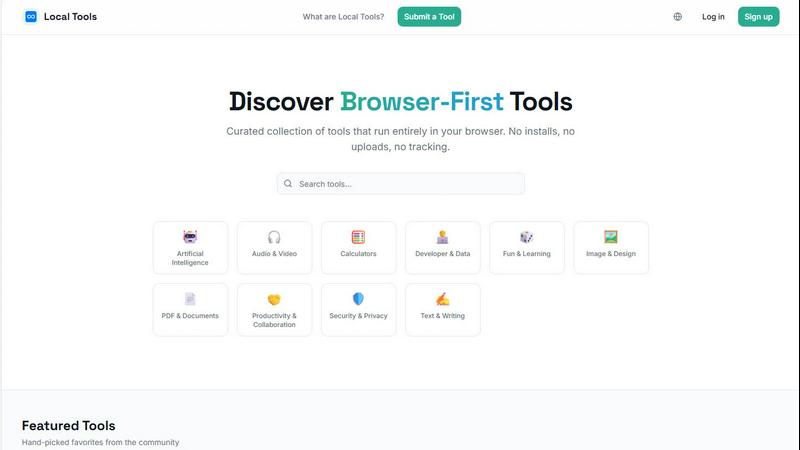
Discover and use thousands of private, browser-based tools that run directly on your device with no installs or tracking.
Last updated: April 4, 2026
Visual Comparison
AI Photo Generator

Local Tools
Feature Comparison
AI Photo Generator
Prompt-to-Masterpiece Generation
Embark on a creative dialogue with our AI. Describe your vision in natural language—the subject, the mood, the intricate play of light and shadow, the finest details. Our fine-tuned AI models listen intently, interpreting your words with remarkable accuracy to deliver images that faithfully match your internal vision. This is where a simple sentence becomes a cinematic scene, a product prototype, or a character from a story yet to be told.
Infinite Style Library & Photo Transformation
Your creative journey should have no stylistic limits. Our platform houses a vast library of artistic styles, from hyper-realistic photography and vibrant anime to classic oil paintings and futuristic 3D renders. Beyond text, you can upload any photo as your starting point. Transform a casual selfie into a professional headshot, reimagine a landscape in a different season, or turn a simple sketch into a fully-realized illustration, all while guiding the transformation with your words.
Ultra-Fast, Optimized Cloud Processing
We eliminate the waiting game that stifles creativity. Our cloud architecture is optimized for speed, ensuring your images are generated in seconds, not minutes. This rapid iteration cycle allows you to experiment freely, generate multiple variants for A/B testing, and refine your concepts on the fly, keeping you in a state of creative flow without technical interruptions.
Professional-Grade Output & Control
This journey leads to professional results. The platform is designed for commercial-grade output, offering high-resolution exports suitable for everything from social media assets to large-format prints. With dedicated model presets for workflows like advertising, portraiture, and e-commerce, you gain control over the balance between speed, detail, and realism, ensuring the final asset is perfectly tuned for its intended purpose.
Local Tools
Curated, Browser-First Directory
Local Tools is not a random aggregation of links; it is a thoughtfully curated collection of over a thousand utilities that are verified to run client-side in your browser. Each tool is categorized—like Image & Design, Developer & Data, or Security & Privacy—creating a structured, navigable library. This curation ensures quality and functionality, saving you from the repetitive and often low-quality alternatives scattered across the web. It’s your map to the best on-device tools available.
Complete Privacy & On-Device Processing
The core promise of Local Tools is uncompromising privacy. Every tool listed operates locally on your machine. Your files, data, and activities never get uploaded to external servers for processing. This means no risk of third-party data mining, no tracking of your usage patterns, and no reliance on an internet connection for the core functionality. It’s a secure, self-reliant way to work, giving you full control and peace of mind.
Streamlined Discovery & Comparison
Finding the right tool for a specific job can be a journey of endless tabs and bookmarks. Local Tools ends that hunt. By bringing thousands of utilities under one roof and organizing them by category and community ratings, it allows for effortless exploration and side-by-side comparison. You can quickly see user ratings, descriptions, and functionalities to choose the most suitable option without ever leaving the platform.
Community-Driven Curation & Submission
The directory is alive and grows through its community. Users can submit new browser-based tools they discover, contributing to the ever-expanding resource. This community-driven model, combined with featured "hand-picked favorites," ensures the collection stays current, diverse, and rich with high-quality, practical utilities that real people find useful in their daily digital journeys.
Use Cases
AI Photo Generator
Content Creation & Social Media Assets
For bloggers, YouTubers, and social media managers, the constant need for fresh, engaging, and copyright-free visuals is a real challenge. This tool becomes your personal art department, generating unique thumbnails, banner images, and post graphics that capture attention and tell your story, all without the hassle of stock photo licenses or complex design software.
Marketing & Advertising Campaigns
Marketers and entrepreneurs can craft stunning visuals for ads, websites, email campaigns, and presentations on a budget. Quickly generate product scene mockups, campaign concept art, and branded imagery. The fast variant generation is perfect for A/B testing different visual directions to see what resonates most with your audience before committing to a final production.
Personal Branding & Professional Portraits
Build a cohesive and compelling personal or team brand. Use the AI Face Generator to create profile-ready, consistent portraits for LinkedIn, company websites, or speaker bios. Transform an existing photo into a polished professional headshot with ideal lighting and background, ensuring you always put your best face forward.
Creative Ideation & Design Projects
Designers, artists, and creative teams can use the platform as a powerful brainstorming partner. Rapidly visualize concepts for client pitches, expand scenes for different aspect ratios with the Image Expander, or generate mood boards and inspiration galleries. It’s an ideal tool for overcoming creative block and exploring visual possibilities at the earliest stages of any project.
Local Tools
The Designer's Instant Editing Studio
A graphic designer receives a last-minute request to convert a batch of SVG files to WebP and quickly remove a background from a product shot. Instead of launching heavy software or trusting sensitive client assets to an unknown website, they visit Local Tools. Within moments, they find dedicated, browser-based converters and an editor like Photopea—a Photoshop alternative—all running locally. The work is done swiftly, privately, and without any installs, keeping their creative flow uninterrupted.
The Developer's Quick Utility Belt
A developer debugging an API response needs to visualize a complex JSON object. They could write a script or search for a standalone app. Instead, they head to Local Tools, find JSON Crack in the Developer & Data section, and paste their code. The data instantly transforms into an interactive graph right in their browser, aiding debugging. Later, they might use a text diff checker or a code formatter from the same hub, all without context-switching to different sites.
The Student's Secure Research Companion
A student working on a thesis needs to merge several PDF articles, count words across multiple documents, and protect their final submission with a password. Concerned about privacy and unwilling to upload academic work to random online services, they use Local Tools. They find all the necessary PDF utilities that process files directly on their laptop, ensuring their research remains confidential while completing essential formatting tasks efficiently.
The Everyday User's Privacy-Conscious Toolkit
Anyone planning their finances can use a salary calculator; someone formatting a resume can use a bullet point generator; a hobbyist can optimize images for a blog with Squoosh. For these everyday tasks, Local Tools provides a trustworthy, ad-free alternative to sketchy websites. Users accomplish their goals without the overhead of software installation or the unease of data tracking, making digital life simpler and more secure.
Overview
About AI Photo Generator
Imagine a world where the barrier between your imagination and the visual world dissolves. Where a fleeting thought, a scribbled note, or an existing photo can be the starting point for a masterpiece. This is the journey that AI Photo Generator invites you on. It is more than a tool; it's your creative companion, built on the belief that profound artistic expression should not be gated by years of technical training or expensive software. Our platform is a gateway, transforming simple text descriptions and your own images into stunning, professional-grade digital art with the power of advanced neural networks. Whether you are a marketer racing against a deadline, a content creator seeking a unique voice, or an entrepreneur building a brand from the ground up, this is where your vision finds its form. We've engineered the process to be intuitive and lightning-fast, ensuring that the spark of an idea can become a tangible, shareable reality in seconds. Your story deserves to be seen, and we provide the canvas and the brush.
About Local Tools
Imagine a digital workshop where every tool you need is laid out on a clean, organized bench, ready to use instantly without any setup. This is the journey Local Tools invites you on. It's more than just a website; it's a curated hub, a sanctuary for anyone who values speed, privacy, and simplicity in their digital tasks. In a world where our data is constantly in transit, Local Tools offers a different path: a collection of thousands of utilities that run entirely within your browser. No software to install, no files to upload to distant servers, and no hidden trackers monitoring your clicks. Everything happens right on your device, turning your browser into a powerful, self-contained workstation.
Built for the curious and the practical—developers tweaking code, designers perfecting an image, students analyzing data, or professionals managing documents—Local Tools simplifies discovery. Instead of wandering the fragmented web, searching for a trustworthy image converter or a secure PDF editor, you arrive at a single, organized directory. It’s structured by function, from AI and audio editing to text writing and security, making it easy to explore, compare, and find the perfect tool for the moment. It’s about reclaiming your workflow, ensuring your creations and data never leave your side, and uncovering hidden gems you might never have found on your own. Your journey to efficient, private computing starts here.
Frequently Asked Questions
AI Photo Generator FAQ
How do I get started with AI Photo Generator?
Your creative journey begins instantly and for free. Simply visit aiphotogenerator.dev, and you can start generating images from text prompts immediately without even creating an account. You can experiment with the core functionality to see the magic firsthand. For extended features and higher volumes, you can register for a free plan that offers additional credits.
What kind of images can I create?
The possibilities are vast. You can create ultra-realistic product photography, artistic portraits, landscape scenes, anime characters, abstract art, poster designs, botanical images, and much more. The key is in your prompt—the more descriptive you are about the subject, style, lighting, and mood, the more accurate and stunning the result will be.
Can I use the generated images for commercial purposes?
Yes, a core value of AI Photo Generator is providing commercially usable output. Images generated on the platform are designed to be used in commercial projects like advertising, website content, product packaging, and social media marketing. Always check the specific terms of your chosen plan for detailed licensing information.
How does the Image-to-Image feature work?
This feature allows you to upload an existing photo as a reference point. The AI uses this image to understand structure, composition, or a person's likeness. You then provide text instructions on what to change—like "change the background to a beach," "make it a oil painting style," or "add a hat." The AI regenerates the image, blending your reference with your new creative direction.
Local Tools FAQ
How does Local Tools ensure my privacy?
Local Tools is a directory, not a processor. We list tools that are built to run entirely within your web browser. This means when you use a tool like Photopea or a PDF converter, your files and data are processed directly on your computer's hardware. They are never uploaded to our servers or the tool creator's servers (unless the tool itself states otherwise). We prioritize listing tools that adhere to this client-side principle, giving you a privacy-first experience.
Do I need to create an account to use the tools?
No, you do not need an account to browse the Local Tools directory or to use the vast majority of tools listed. The tools themselves are external websites, and most are designed to be used immediately without sign-ups. An account on Local Tools is only needed if you wish to participate in the community by rating tools or submitting new ones to the directory.
Are the tools on Local Tools completely free to use?
Local Tools features a wide variety of utilities, and the pricing model is set by each tool's developer. Many of the tools listed, such as Squoosh, Photopea, and Excalidraw, are free to use. Some may offer premium features or subscriptions. Each tool's listing will direct you to its official website where you can find specific details about its cost, if any.
How can I suggest a new tool to be added to the directory?
We welcome and rely on community contributions! If you've found a fantastic browser-based tool that runs locally and isn't yet in our directory, you can submit it for review. Simply click the "Submit a Tool" link in the website's navigation. Our team will review the submission to ensure it meets our criteria for quality, functionality, and privacy before adding it to the curated collection.
Alternatives
AI Photo Generator Alternatives
In the vibrant world of AI image generation, tools like AI Photo Generator represent a powerful category of creative software. These platforms use neural networks to interpret text prompts and transform them into stunning visuals, from photorealistic scenes to artistic masterpieces. They empower everyone, from hobbyists to professionals, to bring their ideas to life without needing years of design experience. Users often explore alternatives for a variety of reasons. Some may seek a different pricing model or subscription tier that better fits their budget. Others might need specific features, like a particular artistic style, more control over image dimensions, or integration with other creative tools. The platform's interface, processing speed, and the unique "feel" of its outputs also play a crucial role in finding the right creative partner. When searching for a different tool, consider what matters most for your creative journey. Look at the core quality and style of the images, the speed of generation, and the intuitiveness of the platform. Evaluate whether it offers the specific functionalities you need, such as uploading reference images or accessing a diverse style library, to ensure it aligns with your projects and workflow.
Local Tools Alternatives
Local Tools is a unique browser-first directory for utilities that run entirely on your device. It belongs to the category of on-device tool platforms, offering a curated, private, and instant way to access thousands of useful applications without installation or data uploads. People explore alternatives for various reasons. Some may seek different organizational structures, a broader or more niche set of tool categories, or platforms integrated with specific workflows. Others might prioritize community features, different discovery methods, or simply want to compare what else exists in this innovative space. When evaluating other options, consider your core needs. Look for a platform's commitment to privacy and local execution, the depth and quality of its curated tool collection, and how intuitively it helps you discover the right utility for your task. The best choice aligns with your desire for convenience, security, and a streamlined workflow.