
AI Formatter vs Receipt Generator
Side-by-side comparison to help you choose the right product.

Start your journey from raw text to a perfectly polished professional document in just a few clicks.
Last updated: March 1, 2026

Receipt Generator
Effortlessly create realistic custom receipts in seconds with over 400 templates, perfect for business and personal use.
Last updated: April 4, 2026
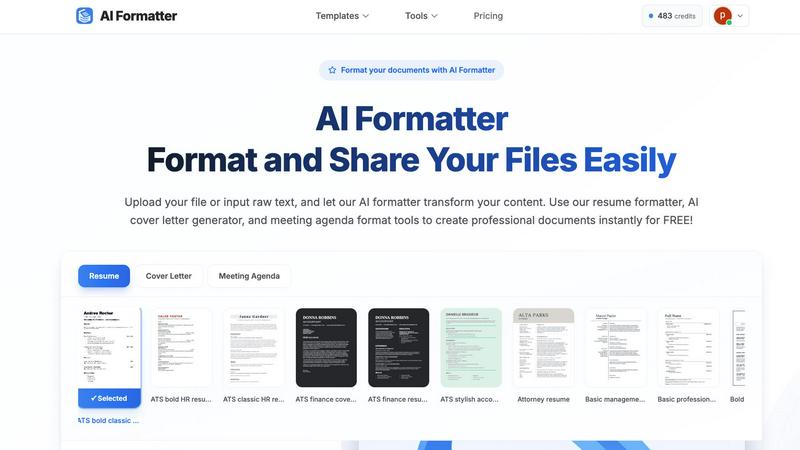
Visual Comparison
AI Formatter
Receipt Generator

Feature Comparison
AI Formatter
Vast Template Library with ATS Optimization
Navigate a curated collection of over 100 professional templates, each engineered for success. From sleek, modern resumes to formal cover letters and structured meeting agendas, every template is designed with ATS (Applicant Tracking System) compatibility at its core. This intelligent design ensures the layout, fonts, and sectioning are parsed correctly by automated software, giving your documents a 95%+ pass rate and a significant advantage in the initial screening stage.
Intelligent AI-Powered Formatting Engine
At the heart of AI Formatter is its revolutionary AI engine. This technology does more than just apply a template; it understands the context and structure of your uploaded content. Whether you provide a messy text document or a basic PDF, the AI intelligently maps your information—like contact details, work experience, and skills—into the appropriate sections of your chosen template, maintaining all your crucial content while bestowing a professional structure upon it.
Real-Time Interactive Editor
After the AI works its initial magic, your journey continues with full creative control. The integrated real-time online editor allows you to fine-tune every detail. Adjust fonts and colors to match your personal or company brand, tweak layouts, and edit text directly within the platform. This seamless transition from AI-generated draft to fully customized final document happens in one fluid workspace, eliminating the need for multiple software tools.
Multi-Format Export & Secure Sharing
Once your document is perfected, AI Formatter provides flexible pathways to share your success. Download your creation in the format you need, including Word (DOCX), PDF, and plain text files. Beyond downloading, utilize built-in secure sharing functionalities to send your document directly to colleagues, clients, or hiring managers straight from the platform, streamlining your workflow from creation to distribution.
Receipt Generator
Extensive Template Library
With a collection of over 400 professionally designed templates, Receipt Generator offers users a wide array of options, covering everything from retail stores to restaurants and pharmacies. Each template is tailored to reflect the unique format and branding of the respective establishment, ensuring authenticity in every receipt.
AI "Place in Scene" Feature
This innovative feature allows users to create photorealistic images of their receipts placed on any surface, such as a desk or countertop. This is particularly beneficial for content creators who need visually appealing mockups for social media, blogs, or marketing materials, all without ever needing to print a physical receipt.
Full Customization Options
Users can customize every aspect of their receipts, including line items, prices, taxes, and payment methods. The drag-and-drop editor simplifies the process, letting users visually arrange receipt blocks and tailor details to match specific needs, ensuring no receipt looks the same.
Instant Download Capability
Receipt Generator provides an instant download option, allowing users to export their finished receipts as high-resolution PNG or PDF files in just one click. This feature streamlines the process of acquiring receipts, removing any waiting time, and ensuring that users can access their documents immediately.
Use Cases
AI Formatter
The Job Seeker's Advantage
For the modern job seeker, the application process is a marathon. AI Formatter acts as your personal pit crew. Upload your existing resume or paste your work history into raw text. Select an ATS-optimized template, and in moments, you have a professionally formatted resume and a matching cover letter generated by AI. This powerful combination ensures you present your best self, pass automated screens, and save invaluable hours to apply for more opportunities.
Streamlining Professional Business Documentation
Professionals and small business owners are constantly creating documents—meeting agendas, project briefs, invoices, and reports. AI Formatter turns this chore into a quick, consistent process. Transform rough meeting notes into a clear, structured agenda format in seconds. Input client and service details to generate a polished, branded invoice. This consistency elevates your professional image and frees up time for core business activities.
Academic and Research Paper Preparation
Students and academics can elevate their submissions with properly formatted papers, theses, and project reports. Instead of wrestling with manual formatting rules for headings, citations, and layouts, users can input their draft content. AI Formatter applies a clean, academic-appropriate structure, allowing the writer to focus on the quality of their research and arguments rather than the tedious presentation details.
Freelancer Portfolio and Proposal Polishing
Freelancers live on the quality of their proposals and portfolio pieces. A well-formatted project proposal or case study can be the difference between winning and losing a client. AI Formatter enables freelancers to quickly take their raw project descriptions and client testimonials, format them into visually appealing documents, and export professional PDFs that make a strong, credible impression from the very first glance.
Receipt Generator
Small Business Expense Tracking
Small business owners can use Receipt Generator to create receipts for transactions and purchases, helping them keep accurate records for accounting and tax purposes. This tool makes it easy to document expenses without the hassle of retaining physical receipts.
Content Creation for Social Media
Content creators can leverage the AI "Place in Scene" feature to generate realistic receipt images for their blogs or social media platforms. This adds a professional touch to their posts and can enhance engagement with visually appealing content.
Inventory Documentation for Resellers
Resellers can create and maintain records of their inventory purchases by generating receipts that reflect their transactions. This helps in keeping track of expenses and ensures accurate reporting for sales and profits.
Personal Use for Budgeting
Individuals can use Receipt Generator to create mock receipts for personal budgeting exercises, allowing them to visualize spending habits and manage finances effectively. This can be a powerful tool for anyone looking to improve their financial literacy.
Overview
About AI Formatter
Imagine staring at a blank page, the pressure mounting as you need to create a professional document that not only looks impeccable but also passes through the invisible gatekeepers of modern hiring: Automated Tracking Systems. This was the universal struggle before AI Formatter. Developed by Sun Sky LLC, AI Formatter is your intelligent co-pilot on the journey from raw, unstructured content to polished, powerful documents. It’s a cloud-based platform where you simply upload your existing Word, PDF, or text files, or input raw text, and watch as advanced AI transforms it in seconds. Tailored for job seekers crafting the perfect resume, professionals preparing meeting agendas, businesses generating invoices, and academics structuring reports, AI Formatter removes the hours of tedious formatting. Its core promise is profound simplicity and exceptional results, boasting a 95%+ ATS pass rate to ensure your resume isn't lost in the digital void. Starting with free credits to begin your journey, it empowers you to create with confidence, saving an average of two hours per document and letting your content shine.
About Receipt Generator
Receipt Generator is the ultimate online tool for creating realistic receipts, designed to cater to a diverse range of users, from small business owners to freelancers, content creators, and resellers. With over 400 store-specific templates available—featuring popular brands like Walmart, Target, Starbucks, and CVS—users can easily customize every aspect of their receipts. Whether you need to adjust item descriptions, prices, payment methods, or dates, the intuitive interface allows for full personalization. One of the standout features is the AI "Place in Scene" capability, enabling users to generate photorealistic images of their receipts on various surfaces, eliminating the need for printing. Fast and efficient, Receipt Generator boasts instant downloads without the hassle of account creation. The platform is widely recognized for its versatility, having facilitated the creation of over 50,000 receipts for more than 10,000 satisfied users around the globe.
Frequently Asked Questions
AI Formatter FAQ
What file formats can I upload to AI Formatter?
AI Formatter is designed for versatility and accepts a wide range of common document formats for upload. You can directly upload files in PDF, DOC, DOCX, and TXT formats. This covers most documents created in word processors, exported from other software, or saved as simple text, making it easy to start your formatting journey with content you already have.
How does the ATS optimization feature work?
Our ATS optimization is built into the DNA of our professional templates. These templates are designed with clean, parsable layouts, standard section headings, and compatible fonts that Applicant Tracking Systems can easily read and interpret. By using an AI Formatter template, you avoid common formatting mistakes that cause ATS systems to reject or misread resumes, significantly increasing your document's chance of reaching a human recruiter.
Is my document content secure and private?
Absolutely. Security and privacy are paramount at AI Formatter. We employ robust, industry-standard security measures to protect your data. Your uploaded documents and content are processed securely in our cloud environment and are not shared with third parties. You remain in complete control of your information throughout the formatting and sharing process.
Can I edit my document after the AI formats it?
Yes, and this is a key part of the AI Formatter experience. Once the AI engine applies the initial format and structure, your document opens in our intuitive real-time online editor. Here, you have full freedom to customize everything: edit any text, change fonts and colors, adjust spacing, and rearrange sections as you see fit. The AI provides a powerful starting point, but you have the final say.
Receipt Generator FAQ
Is Receipt Generator free to use?
Yes, Receipt Generator offers a free tier that allows users to create receipts with a watermark. For those who need unlimited downloads and additional features, pro plans are available for a nominal fee.
Can I customize the templates?
Absolutely! Receipt Generator provides full customization options, allowing users to edit line items, prices, payment methods, and more to suit their specific needs.
Do I need an account to use Receipt Generator?
No, you do not need to create an account to start using Receipt Generator. You can begin creating receipts immediately, enhancing accessibility for all users.
What formats can I download my receipts in?
Users can download their receipts in high-resolution PNG or PDF formats, making it easy to store and share their documents as needed.
Alternatives
AI Formatter Alternatives
In the bustling world of productivity tools, AI Formatter stands as a dedicated companion for anyone on the journey from raw text to polished, professional documents. It belongs to a category of AI-driven writing and formatting assistants, designed to transform the tedious task of document creation into a swift, almost magical, experience. Yet, every traveler's path is unique, and the quest for the perfect tool often leads to exploring other options. Users set out to find alternatives for many reasons. Perhaps they seek a different pricing landscape that better fits their budget, or they need specific features that align with a niche workflow. Others might be looking for a tool that integrates seamlessly with their existing platform or simply desire a different user experience. The digital toolbox is vast, and the right fit is deeply personal. When evaluating other paths, consider what matters most on your journey. Look for a tool that not only meets your core formatting needs but also feels intuitive to use. Assess the value it provides against its cost, the security of your data, and the flexibility it offers for your specific documents. The goal is to find a partner that empowers your process, saving you time and elevating your work without adding complexity.
Receipt Generator Alternatives
Receipt Generator is a powerful online tool designed for creating custom receipts with over 400 templates tailored to popular stores. It falls under the productivity and management category, offering users the ability to quickly and easily generate high-resolution receipts without the need for an account. Users often seek alternatives to Receipt Generator for various reasons, including pricing structures, specific features, or compatibility with their preferred platforms. When searching for an alternative, it’s essential to consider factors such as ease of use, the range of templates available, customization options, and any additional features that may enhance the receipt creation experience. A good alternative should also ensure quick downloads and a seamless user experience, allowing for efficient management of receipts and related documentation.