
AI Formatter vs Outbid
Side-by-side comparison to help you choose the right product.
Start your journey from raw text to a perfectly polished professional document in just a few clicks.
Last updated: March 1, 2026

Outbid instantly alerts you to new Upwork jobs and drafts AI proposals so you can apply first and win more work.
Last updated: March 19, 2026
Visual Comparison
AI Formatter
Outbid

Feature Comparison
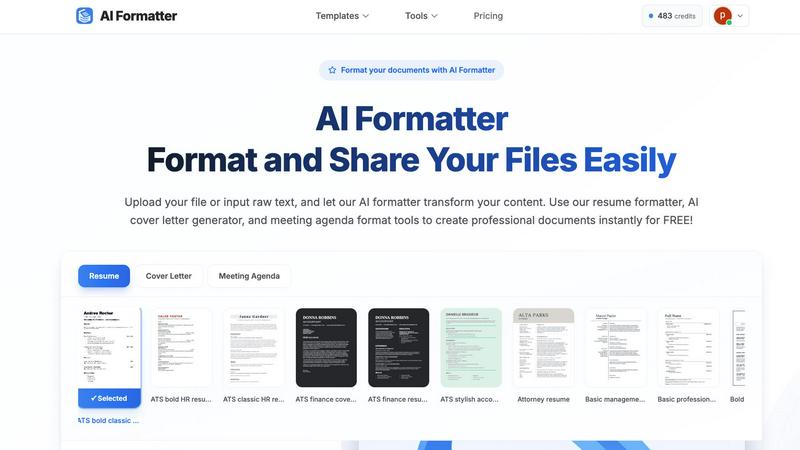
AI Formatter
Vast Template Library with ATS Optimization
Navigate a curated collection of over 100 professional templates, each engineered for success. From sleek, modern resumes to formal cover letters and structured meeting agendas, every template is designed with ATS (Applicant Tracking System) compatibility at its core. This intelligent design ensures the layout, fonts, and sectioning are parsed correctly by automated software, giving your documents a 95%+ pass rate and a significant advantage in the initial screening stage.
Intelligent AI-Powered Formatting Engine
At the heart of AI Formatter is its revolutionary AI engine. This technology does more than just apply a template; it understands the context and structure of your uploaded content. Whether you provide a messy text document or a basic PDF, the AI intelligently maps your information—like contact details, work experience, and skills—into the appropriate sections of your chosen template, maintaining all your crucial content while bestowing a professional structure upon it.
Real-Time Interactive Editor
After the AI works its initial magic, your journey continues with full creative control. The integrated real-time online editor allows you to fine-tune every detail. Adjust fonts and colors to match your personal or company brand, tweak layouts, and edit text directly within the platform. This seamless transition from AI-generated draft to fully customized final document happens in one fluid workspace, eliminating the need for multiple software tools.
Multi-Format Export & Secure Sharing
Once your document is perfected, AI Formatter provides flexible pathways to share your success. Download your creation in the format you need, including Word (DOCX), PDF, and plain text files. Beyond downloading, utilize built-in secure sharing functionalities to send your document directly to colleagues, clients, or hiring managers straight from the platform, streamlining your workflow from creation to distribution.
Outbid
24/7 Real-Time Monitoring & Alerts
Outbid never sleeps. It scans the Upwork marketplace every 60 seconds, day and night, ensuring no opportunity slips through the cracks. The moment a job matching your criteria is posted, you receive an instant, actionable alert directly in your Telegram app. This constant vigilance means you're applying while other freelancers are still unaware the job even exists, giving you a critical head start in the client's inbox.
AI-Powered Proposal Generation
Each alert comes with more than just a job link. Outbid's AI analyzes the specific job description and your provided skills and bio to generate a personalized proposal draft. This draft is a strong starting point, professionally written to align with the client's needs and highlight your relevant experience. It turns the daunting task of writing from scratch into a simple process of reviewing, tweaking, and submitting, saving you hours every week.
Smart Filtering & Quiet Hours
Not every job is worth your time. Outbid's smart filtering system lets you fine-tune your alerts to see only the opportunities that truly fit. You can filter by required skills, client budget, experience level, and even set "quiet hours" to pause notifications during your off-time. This ensures your focus remains on high-potential jobs that match your career goals and work-life balance, preventing alert fatigue.
War Room Strategy Mode
For highly competitive listings where standing out is paramount, the War Room Strategy Mode gives you an edge. This feature allows you to add custom instructions to the AI, guiding the tone, style, and key points of your proposal. You can also regenerate proposals on the fly to test different angles. It's your command center for crafting the perfect, strategic pitch to win in crowded, high-stakes environments.
Use Cases
AI Formatter
The Job Seeker's Advantage
For the modern job seeker, the application process is a marathon. AI Formatter acts as your personal pit crew. Upload your existing resume or paste your work history into raw text. Select an ATS-optimized template, and in moments, you have a professionally formatted resume and a matching cover letter generated by AI. This powerful combination ensures you present your best self, pass automated screens, and save invaluable hours to apply for more opportunities.
Streamlining Professional Business Documentation
Professionals and small business owners are constantly creating documents—meeting agendas, project briefs, invoices, and reports. AI Formatter turns this chore into a quick, consistent process. Transform rough meeting notes into a clear, structured agenda format in seconds. Input client and service details to generate a polished, branded invoice. This consistency elevates your professional image and frees up time for core business activities.
Academic and Research Paper Preparation
Students and academics can elevate their submissions with properly formatted papers, theses, and project reports. Instead of wrestling with manual formatting rules for headings, citations, and layouts, users can input their draft content. AI Formatter applies a clean, academic-appropriate structure, allowing the writer to focus on the quality of their research and arguments rather than the tedious presentation details.
Freelancer Portfolio and Proposal Polishing
Freelancers live on the quality of their proposals and portfolio pieces. A well-formatted project proposal or case study can be the difference between winning and losing a client. AI Formatter enables freelancers to quickly take their raw project descriptions and client testimonials, format them into visually appealing documents, and export professional PDFs that make a strong, credible impression from the very first glance.
Outbid
The Busy Established Freelancer
You have a full roster of clients and can't afford to constantly refresh Upwork for new leads, but you want to keep your pipeline healthy. Outbid acts as your personal scout, working in the background. It surfaces only the best-fitting, high-budget opportunities and delivers a ready-to-send proposal to your phone. You can secure a promising new project in the minute between meetings, effortlessly growing your business without it consuming your day.
The Newcomer Building a Profile
Starting on Upwork is daunting. You're competing against veterans, and writing compelling proposals is a new skill. Outbid provides a guiding hand. It gets you in front of jobs instantly, and the AI-generated proposals serve as an expert template. You learn what works by seeing professionally crafted drafts tailored to real jobs, building your confidence and success rate as you establish your reputation and land those crucial first reviews.
The Niche Specialist Seeking Ideal Clients
Your skills are specific, and perfect projects are rare gems. Manually sifting through hundreds of irrelevant postings is inefficient. Outbid’s precise filtering ensures you only get alerts for jobs that exactly match your niche expertise and desired rate. When that dream project appears, you're notified immediately with a proposal that speaks the client's technical language, dramatically increasing your chance of a perfect match.
The Freelancer in a Competitive Time Zone
You're based in a region where clients post jobs while you're asleep. You wake up to find the best opportunities already flooded with applications. Outbid levels the playing field. It applies for you around the clock, ensuring your proposal is waiting for the client first thing in their morning. Your location no longer dictates your access to global opportunities, allowing you to compete and win on the merit of your speed and preparation.
Pricing Comparison
AI Formatter
AI Formatter believes in starting your formatting journey without barriers, offering 10 free credits to explore the platform. For ongoing needs, scalable plans are available to suit different users. Plans range from a Free tier with basic access to an all-encompassing Enterprise plan priced at $199.99 per month, which provides unlimited formatting capabilities for high-volume users and businesses.
Outbid
Outbid offers a simple, tiered pricing model designed to scale with your needs. You can start for free and upgrade to unlock more powerful features.
Free Access ($0): Perfect for trying the service. Includes unlimited job alerts but with blurred proposal text and no direct job links. Comes with 3 lifetime "reveal" credits to unblur a few proposals.
Monthly Pro ($9.99/month): The professional standard for serious freelancers. Includes unlimited job reveals with full AI proposals for every job, direct application links, War Room strategy mode for custom proposals, and priority support.
Elite ($19.99/month): For freelancers who want every possible advantage. Includes all Pro features, plus advanced AI job matching to surface ideal opportunities and "Sniper Mode," which only alerts you for jobs with an 80%+ fit to your profile, maximizing your application efficiency.
Overview
About AI Formatter
Imagine staring at a blank page, the pressure mounting as you need to create a professional document that not only looks impeccable but also passes through the invisible gatekeepers of modern hiring: Automated Tracking Systems. This was the universal struggle before AI Formatter. Developed by Sun Sky LLC, AI Formatter is your intelligent co-pilot on the journey from raw, unstructured content to polished, powerful documents. It’s a cloud-based platform where you simply upload your existing Word, PDF, or text files, or input raw text, and watch as advanced AI transforms it in seconds. Tailored for job seekers crafting the perfect resume, professionals preparing meeting agendas, businesses generating invoices, and academics structuring reports, AI Formatter removes the hours of tedious formatting. Its core promise is profound simplicity and exceptional results, boasting a 95%+ ATS pass rate to ensure your resume isn't lost in the digital void. Starting with free credits to begin your journey, it empowers you to create with confidence, saving an average of two hours per document and letting your content shine.
About Outbid
Imagine the perfect Upwork job just posted. By the time most freelancers see it hours later, it's already buried under dozens of applications. Your journey to winning it feels over before it even began. Outbid changes that story. Built by freelancers who lived this frustration, Outbid is your 24/7 sentinel on the Upwork battlefield. It's a tool designed for one mission: to get you to the front of the line. It continuously scans new job postings and sends you an instant alert via Telegram within 60 seconds, complete with a tailored, AI-written proposal draft. This isn't just about speed; it's about transforming your opportunity from a frantic race into a strategic advantage. Whether you're a seasoned pro tired of manually refreshing your feed or a newcomer unsure how to craft a winning proposal, Outbid streamlines your path to success. It handles the relentless monitoring and the heavy lifting of draft creation, empowering you to focus on what you do best—your work. For over a thousand freelancers worldwide, Outbid has become the trusted companion that turns the anxiety of missing out into the confidence of being first in.
Frequently Asked Questions
AI Formatter FAQ
What file formats can I upload to AI Formatter?
AI Formatter is designed for versatility and accepts a wide range of common document formats for upload. You can directly upload files in PDF, DOC, DOCX, and TXT formats. This covers most documents created in word processors, exported from other software, or saved as simple text, making it easy to start your formatting journey with content you already have.
How does the ATS optimization feature work?
Our ATS optimization is built into the DNA of our professional templates. These templates are designed with clean, parsable layouts, standard section headings, and compatible fonts that Applicant Tracking Systems can easily read and interpret. By using an AI Formatter template, you avoid common formatting mistakes that cause ATS systems to reject or misread resumes, significantly increasing your document's chance of reaching a human recruiter.
Is my document content secure and private?
Absolutely. Security and privacy are paramount at AI Formatter. We employ robust, industry-standard security measures to protect your data. Your uploaded documents and content are processed securely in our cloud environment and are not shared with third parties. You remain in complete control of your information throughout the formatting and sharing process.
Can I edit my document after the AI formats it?
Yes, and this is a key part of the AI Formatter experience. Once the AI engine applies the initial format and structure, your document opens in our intuitive real-time online editor. Here, you have full freedom to customize everything: edit any text, change fonts and colors, adjust spacing, and rearrange sections as you see fit. The AI provides a powerful starting point, but you have the final say.
Outbid FAQ
How fast are the alerts?
Outbid is engineered for speed. Our system scans Upwork for new jobs every 60 seconds. The moment a job matching your filters is detected, an alert is pushed directly to your Telegram. In practice, this means you are typically notified and can be applying within 60-90 seconds of a job being posted, putting you ahead of 99% of other freelancers.
Do I need to be tech-savvy to use Outbid?
Not at all. Outbid is designed for zero technical friction. The entire setup happens within Telegram, a familiar messaging app. You simply message the bot, answer a few quick questions about your skills, and you're done. There's no app to download or complex dashboard to learn. The alerts and proposals are delivered in a simple, mobile-friendly format ready for easy copy-pasting.
Can I customize the AI-generated proposals?
Absolutely. While each proposal is generated to be strong and relevant out of the gate, it is meant to be your starting draft. You can—and should—edit, personalize, and add your own voice before submitting. For advanced customization, the Pro and Elite plans offer "War Room Strategy Mode," which allows you to give the AI custom instructions to shape the proposal's style and strategic focus.
Is Outbid affiliated with Upwork?
No, Outbid is an independent tool built by freelancers to help other freelancers succeed on the Upwork platform. We are not affiliated with, endorsed by, or partnered with Upwork.com. We operate in compliance with Upwork's Terms of Service as a monitoring and productivity aid for freelancers using the platform.
Alternatives
AI Formatter Alternatives
In the bustling world of productivity tools, AI Formatter stands as a dedicated companion for anyone on the journey from raw text to polished, professional documents. It belongs to a category of AI-driven writing and formatting assistants, designed to transform the tedious task of document creation into a swift, almost magical, experience. Yet, every traveler's path is unique, and the quest for the perfect tool often leads to exploring other options. Users set out to find alternatives for many reasons. Perhaps they seek a different pricing landscape that better fits their budget, or they need specific features that align with a niche workflow. Others might be looking for a tool that integrates seamlessly with their existing platform or simply desire a different user experience. The digital toolbox is vast, and the right fit is deeply personal. When evaluating other paths, consider what matters most on your journey. Look for a tool that not only meets your core formatting needs but also feels intuitive to use. Assess the value it provides against its cost, the security of your data, and the flexibility it offers for your specific documents. The goal is to find a partner that empowers your process, saving you time and elevating your work without adding complexity.
Outbid Alternatives
Outbid is a productivity tool designed to help freelancers win more work on Upwork. It operates in the category of job alert and proposal automation, giving users a crucial speed advantage by sending instant notifications and AI-generated application drafts directly to their Telegram. Users often explore alternatives for various reasons. Some may need a tool that integrates with different freelancing platforms beyond Upwork, while others might seek different pricing models or more control over the automation features. The specific needs of a freelancer's workflow and budget are key drivers in this search. When evaluating other options, consider what matters most for your success. Look at the platforms supported, the speed and reliability of alerts, the quality of any automated proposal assistance, and the overall value for the investment. The right tool should feel like a seamless extension of your own proactive job-hunting strategy.